> ## Documentation Index
> Fetch the complete documentation index at: https://docs.claimr.io/llms.txt
> Use this file to discover all available pages before exploring further.
# Campaign sign-in options
> Configure login requirements, wallet behavior, sign-in services, and supported chains for your campaign.
To ensure the Claimr widget works correctly with your dApp, make sure to configure the campaign settings accordingly.
To access these settings:
1. Log in to your Claimr account.
2. Select the **Campaign** you want to apply settings to.
3. Navigate to the campaign's **Settings** section.
4. Select **Sign-in options** from the settings menu.
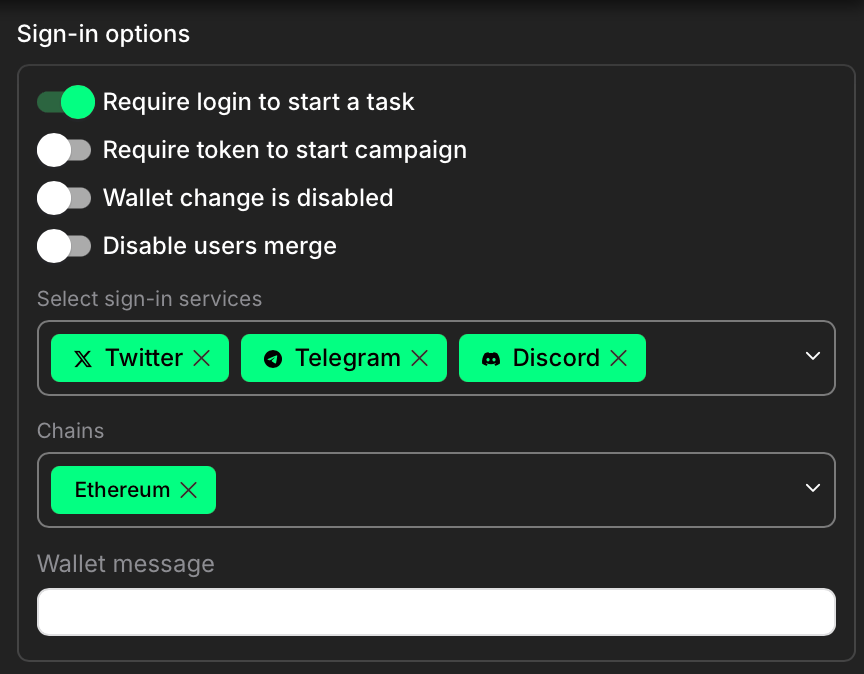 ### Require login to start a task
Ensure that users must log in (e.g. via wallet) before they can begin any task. This is necessary for Claimr to associate actions with an authenticated wallet address.
### Require token to start campaign
If enabled, this would require a specific token to access the campaign.
### Wallet change is disabled
Prevent users from switching wallets mid-session.
### Disable users merge
Disables automatic merging of user identities across sign-in methods.
### Select sign-in services
Choose the platforms users can log in with (e.g., Twitter, Telegram, Discord). You can enable one or multiple options.
### Chains
Select the blockchain networks supported by your campaign (e.g., Ethereum). These define where wallet-based actions will be validated.
### Wallet message field
Enter a custom message that will be shown to users during wallet signature to identify the purpose of signing.
### Require login to start a task
Ensure that users must log in (e.g. via wallet) before they can begin any task. This is necessary for Claimr to associate actions with an authenticated wallet address.
### Require token to start campaign
If enabled, this would require a specific token to access the campaign.
### Wallet change is disabled
Prevent users from switching wallets mid-session.
### Disable users merge
Disables automatic merging of user identities across sign-in methods.
### Select sign-in services
Choose the platforms users can log in with (e.g., Twitter, Telegram, Discord). You can enable one or multiple options.
### Chains
Select the blockchain networks supported by your campaign (e.g., Ethereum). These define where wallet-based actions will be validated.
### Wallet message field
Enter a custom message that will be shown to users during wallet signature to identify the purpose of signing.