> ## Documentation Index
> Fetch the complete documentation index at: https://docs.claimr.io/llms.txt
> Use this file to discover all available pages before exploring further.
# Failed actions
> See a log-by-task and log-by-user breakdown of actions users attempted that resulted in failure, to improve task clarity and user flow.
## What are Failed Actions analytics?
Failed Actions analytics provides a detailed overview of actions users attempted that resulted in failure. This helps identify common issues and potential areas for improvement in the user experience when completing tasks within Claimr.
## Use this data to
* **Identify frequent failure points:** Spot specific actions or tasks that consistently cause issues.
* **Assess impact:** Understand the proportion of users affected by task failures.
* **Improve task clarity and execution:** Address problems to minimize user frustration and ensure successful task completion.
* **Optimize user flow:** Make changes to tasks, improving the users' experience in completing the tasks.
## Accessing Failed Actions analytics
1. Log in to your Claimr account.
2. Select the relevant campaign.
3. Click on the **Analytics** tab.
4. Select **Failed Actions** from the submenu.
Once you select "Failed Actions", the dashboard will open, displaying two tables. These tables provide a comprehensive view of failed user actions, offering both aggregated and individual-level data.
## Failed Actions log by task
This table offers you detailed insights into specific task failures.
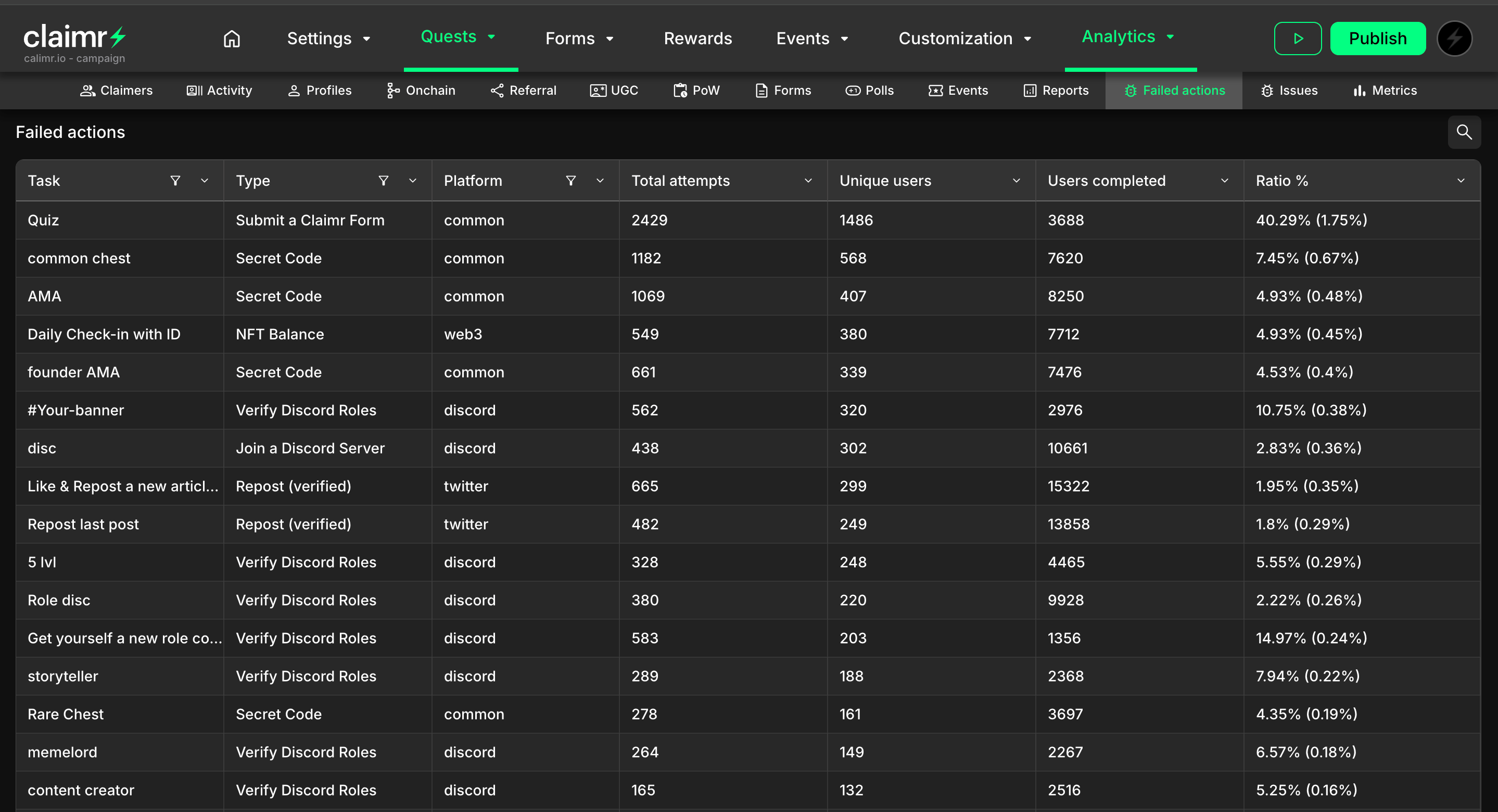 * **Task:** The specific task that users attempted to complete.
* **Type:** The type of action users performed when attempting the task (e.g., "Follow on X").
* **Platform:** The platform where the action was attempted.
* **Total attempts:** The total number of times users attempted to perform this task.
* **Unique users:** The number of unique users who tried to complete the task, regardless of success or failure.
* **Users completed:** The number of unique users who successfully completed the task.
* **Ratio %:**
* The first percentage shows the ratio of unique users who experienced at least one failure on this action, compared to the total number of unique users who attempted it.
* The percentage within parentheses shows the ratio of users who had at least one failed action anywhere within the campaign versus all of the participants in the campaign.
## Failed Actions log by user
* **Task:** The specific task that users attempted to complete.
* **Type:** The type of action users performed when attempting the task (e.g., "Follow on X").
* **Platform:** The platform where the action was attempted.
* **Total attempts:** The total number of times users attempted to perform this task.
* **Unique users:** The number of unique users who tried to complete the task, regardless of success or failure.
* **Users completed:** The number of unique users who successfully completed the task.
* **Ratio %:**
* The first percentage shows the ratio of unique users who experienced at least one failure on this action, compared to the total number of unique users who attempted it.
* The percentage within parentheses shows the ratio of users who had at least one failed action anywhere within the campaign versus all of the participants in the campaign.
## Failed Actions log by user
 * **User:** The username or identifier of the user who experienced the failure.
* **Date:** The date and time when the failed action occurred.
* **Task:** The name of a specific task the user was attempting to complete.
* **Type:** The type of the task the user performed.
* **Platform:** The platform where the failed action occurred.
Clicking on any field within this table will open a User Information modal, providing detailed information about the selected user.
For more details about all User information in Claimr, visit [User information](/data-analytics/user-information).
* **User:** The username or identifier of the user who experienced the failure.
* **Date:** The date and time when the failed action occurred.
* **Task:** The name of a specific task the user was attempting to complete.
* **Type:** The type of the task the user performed.
* **Platform:** The platform where the failed action occurred.
Clicking on any field within this table will open a User Information modal, providing detailed information about the selected user.
For more details about all User information in Claimr, visit [User information](/data-analytics/user-information).