> ## Documentation Index
> Fetch the complete documentation index at: https://docs.claimr.io/llms.txt
> Use this file to discover all available pages before exploring further.
# Form settings
> Rename your form, configure page pagination and legacy quiz mode, and set a minimum height to keep multi-page forms visually consistent.
Customize the appearance and behavior of your forms with Claimr.
 ## General
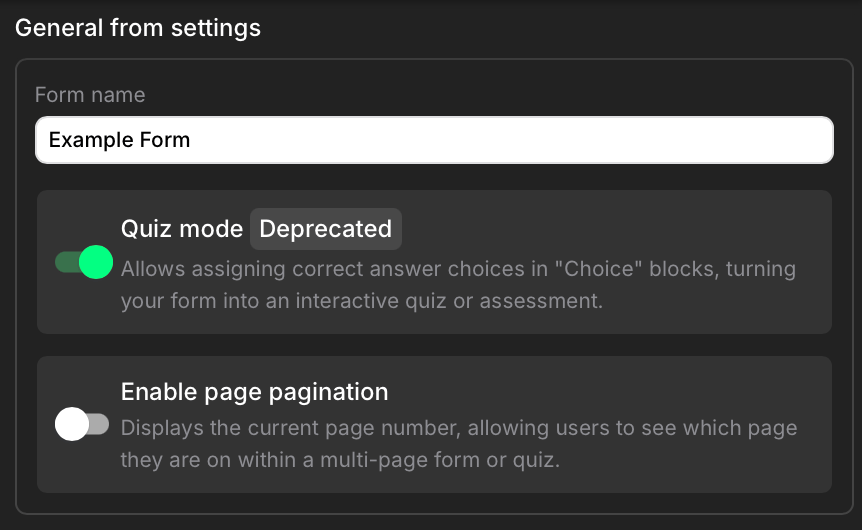
* **Form name:** This field displays the current name of the form. You can edit the form name directly within this field.
* **Quiz mode (Deprecated):** This toggle enables quiz functionality within forms. However, this method is outdated and no longer recommended. To create quizzes, use the dedicated Quizzes feature, which provides a significantly improved experience. To find out more, read our [Quizzes](/forms/quizzes) article.
* **Enable page pagination:** This toggle enables page numbering within the form. When enabled, users will see the current page number, allowing them to track their progress through multi-page forms or quizzes.
## Customization
* **Form min-height:** This field specifies the minimum height of the form in pixels. This helps maintain a consistent visual appearance when your form has multiple pages with varying content. By setting a minimum height, you prevent the form from shrinking or expanding drastically as users navigate between pages.
If you have a multi-page form with some pages having a lot of content and others having very little, setting a form min-height will prevent the form's overall height from jumping around as users navigate. This creates a smoother and more visually consistent experience.
## General
* **Form name:** This field displays the current name of the form. You can edit the form name directly within this field.
* **Quiz mode (Deprecated):** This toggle enables quiz functionality within forms. However, this method is outdated and no longer recommended. To create quizzes, use the dedicated Quizzes feature, which provides a significantly improved experience. To find out more, read our [Quizzes](/forms/quizzes) article.
* **Enable page pagination:** This toggle enables page numbering within the form. When enabled, users will see the current page number, allowing them to track their progress through multi-page forms or quizzes.
## Customization
* **Form min-height:** This field specifies the minimum height of the form in pixels. This helps maintain a consistent visual appearance when your form has multiple pages with varying content. By setting a minimum height, you prevent the form from shrinking or expanding drastically as users navigate between pages.
If you have a multi-page form with some pages having a lot of content and others having very little, setting a form min-height will prevent the form's overall height from jumping around as users navigate. This creates a smoother and more visually consistent experience.