> ## Documentation Index
> Fetch the complete documentation index at: https://docs.claimr.io/llms.txt
> Use this file to discover all available pages before exploring further.
# Common tasks: lightweight actions for onboarding and manual interactions
> Flexible tasks for basic actions, onboarding steps, and manual interactions in your quests.
## What are Common tasks?
Common tasks are lightweight, versatile tasks that guide users through actions without requiring external validation, connected accounts, or blockchain verification. Use them for instructional steps, manual confirmations, form submissions, code distribution, and simple user interactions.
**Use Common tasks to:**
* Add manual or instructional steps to your quest
* Confirm actions without collecting evidence
* Collect form-based input or votes
* Distribute invite or gift codes
* Track daily engagement or task streaks
* Integrate custom rewards and routing logic
For detailed information about general task settings, including task header, description, rewards, dependencies, and more, refer to [Task Settings](/tasks/task-settings).
## Available Common tasks
Claimr offers Common tasks for various lightweight interactions. All tasks are found in the **Common** group under the **General** category.
**Engagement & tracking**
* Daily Checkin - User checks in daily to earn rewards
* Tasks Streak - User completes tasks N days in a row
* Custom Events Count - Track how many times a custom event occurred
* Custom Events Value - Track numeric value of a custom event
* Custom Events Streak - Track how many days a custom event occurred in a row
**User input & validation**
* Block - Simple click interaction or confirmation block
* Custom Task - Custom-defined action outside predefined categories
* Secret Code - User must enter a secret code to validate action
* Poll - User participates in a poll or survey
**Forms & data collection**
* Submit a Claimr Form - User fills and submits a Claimr form
* Submit an email - User submits their email address
**Codes & rewards**
* Claim a Reward - User claims earned reward after task completion
* Enter Invite Code - User enters an invite code to join campaign
* Claim Invite Codes - User redeems or distributes invite codes
* Claim Gift Codes - User redeems gift or promo codes
* Custom Reward - Reward defined by custom campaign rules
**Navigation & connections**
* Visit a Link - User must visit a specific external or campaign link
* Referral Link - Track user's referral link visits and signups
* Connect an Account - User logs into the connected app or service
* HTTP Request - Trigger or validate an external HTTP request
**Team & organization**
* Team Selector - User selects a team or group affiliation
## Create a task
1. From your campaign dashboard, go to the **Quests** tab and click on the quest where you want to add a Common task.
2. On the quest settings page, click **+ Create new task**.
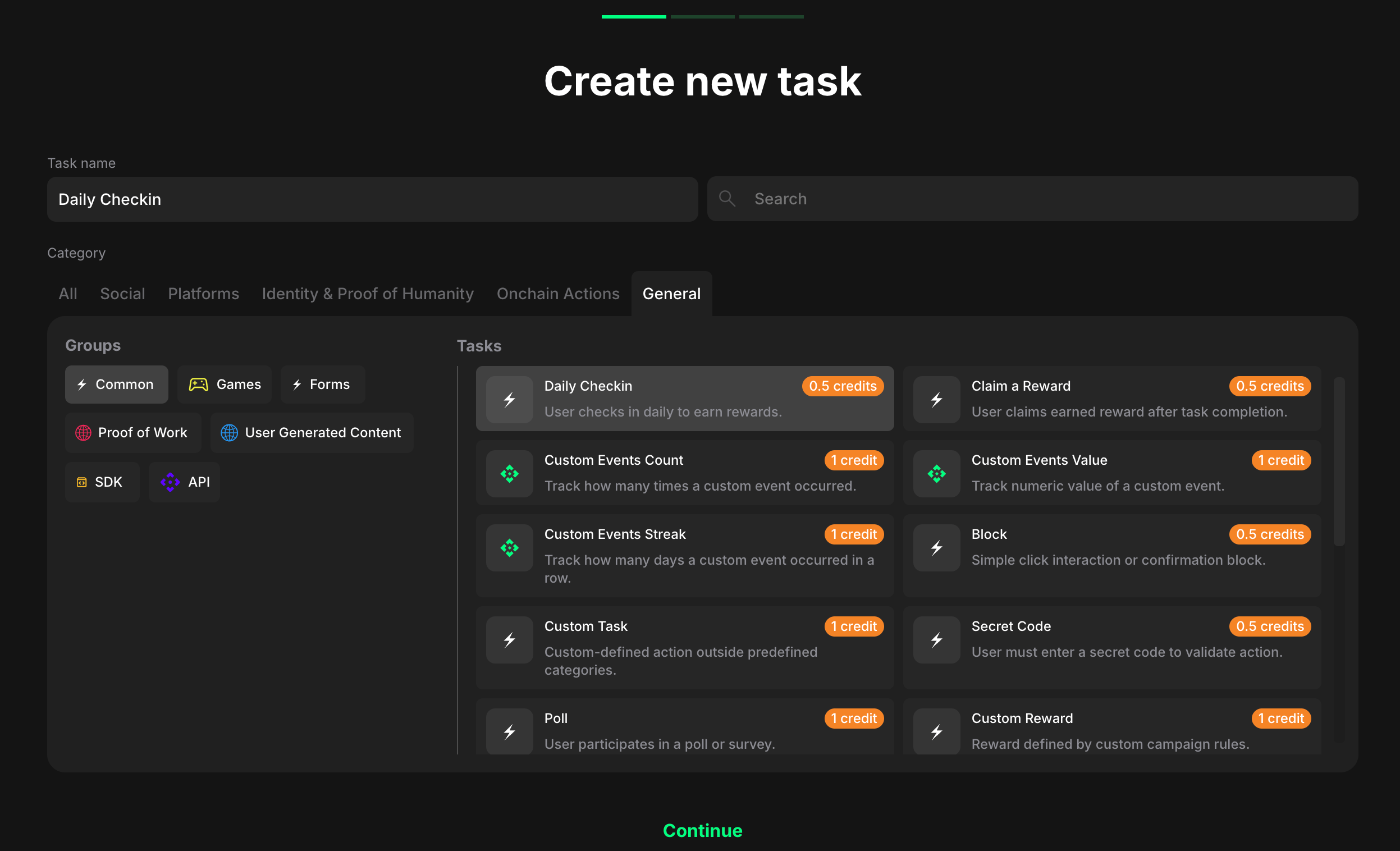 3. In the Category section, click **General**.
4. In the Groups section, click **Common** and browse the available Common tasks.
5. Select the task that matches your campaign goal and click **Continue**.
### Configure task settings
Each Common task has specific configuration options.
3. In the Category section, click **General**.
4. In the Groups section, click **Common** and browse the available Common tasks.
5. Select the task that matches your campaign goal and click **Continue**.
### Configure task settings
Each Common task has specific configuration options.
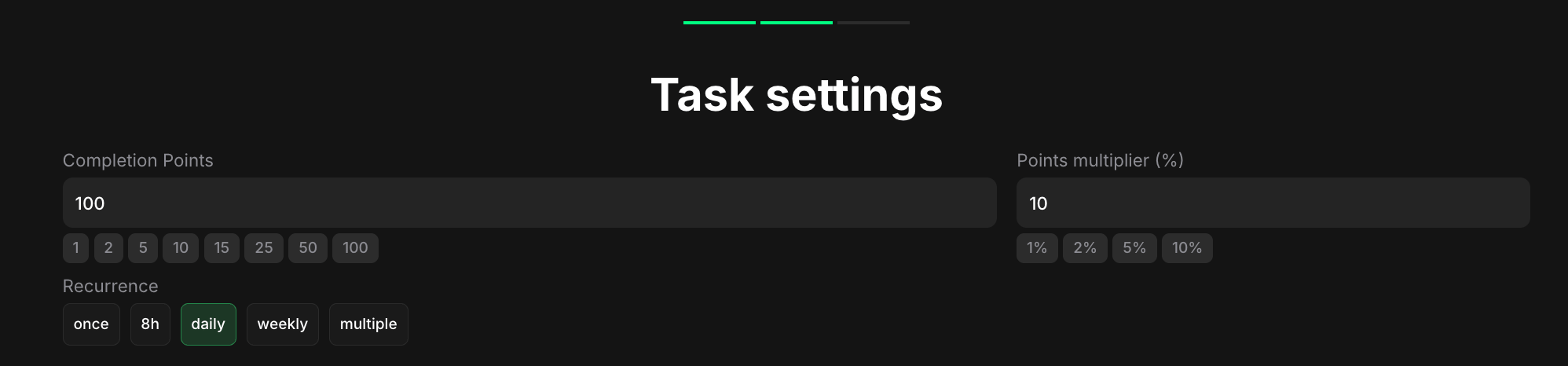 Common settings include:
**Completion points**: Set the number of points awarded when the user completes the task.
**Points multiplier (%)**: Add a percentage-based bonus to the total reward.
**Recurrence** (for applicable tasks): Control how often users can complete the task (once, daily, weekly, multiple).
Click **Advance settings** to configure additional options like dependencies, completion pop-ups, and metadata.
Click **Create task** to save your Common task.
To see how your task will appear to users, click **Preview**. This will open a new tab showcasing three different views: desktop, tablet, and mobile. You can toggle between these views to ensure your task looks and functions seamlessly across all devices.
**Pro tip**: Common tasks work best for onboarding flows, instructional content, or campaign mechanics that don't require external verification. Combine them with verified tasks (X, Web3, etc.) to create comprehensive quest journeys.
## Explore Common task types
Guide users through a simple confirmation click or a piece of text to copy.
Collect a free-form text answer as verification of an off-platform action.
Collect user opinions through simple voting interactions.
Reward users for returning to your quest day after day.
Collect verified user emails with one-time code confirmation.
Reward users for referring others to your campaign.
Reward users for clicking a specified URL.
Integrate your own APIs into your claimr quests.
Common settings include:
**Completion points**: Set the number of points awarded when the user completes the task.
**Points multiplier (%)**: Add a percentage-based bonus to the total reward.
**Recurrence** (for applicable tasks): Control how often users can complete the task (once, daily, weekly, multiple).
Click **Advance settings** to configure additional options like dependencies, completion pop-ups, and metadata.
Click **Create task** to save your Common task.
To see how your task will appear to users, click **Preview**. This will open a new tab showcasing three different views: desktop, tablet, and mobile. You can toggle between these views to ensure your task looks and functions seamlessly across all devices.
**Pro tip**: Common tasks work best for onboarding flows, instructional content, or campaign mechanics that don't require external verification. Combine them with verified tasks (X, Web3, etc.) to create comprehensive quest journeys.
## Explore Common task types
Guide users through a simple confirmation click or a piece of text to copy.
Collect a free-form text answer as verification of an off-platform action.
Collect user opinions through simple voting interactions.
Reward users for returning to your quest day after day.
Collect verified user emails with one-time code confirmation.
Reward users for referring others to your campaign.
Reward users for clicking a specified URL.
Integrate your own APIs into your claimr quests.