> ## Documentation Index
> Fetch the complete documentation index at: https://docs.claimr.io/llms.txt
> Use this file to discover all available pages before exploring further.
# LinkedIn tasks
> Reward users for reposting your LinkedIn content directly from the feed, verified automatically through the LinkedIn embed.
## What are LinkedIn tasks?
LinkedIn tasks in Claimr allow you to reward users for interacting with your LinkedIn content directly from the feed. These tasks are verified automatically once the user connects their LinkedIn account and completes the repost action via Claimr.
**Use LinkedIn tasks to:**
* **Amplify your brand**: Let your followers help spread updates, partnership news, and major announcements within professional circles.
* **Drive engagement**: Boost impressions and reposts on targeted posts to strengthen your organic reach.
* **Automate reward validation**: Eliminate manual review by tracking reposts directly through the LinkedIn embed.
## Create LinkedIn task
Choose the specific type of task you want to create for your campaign.
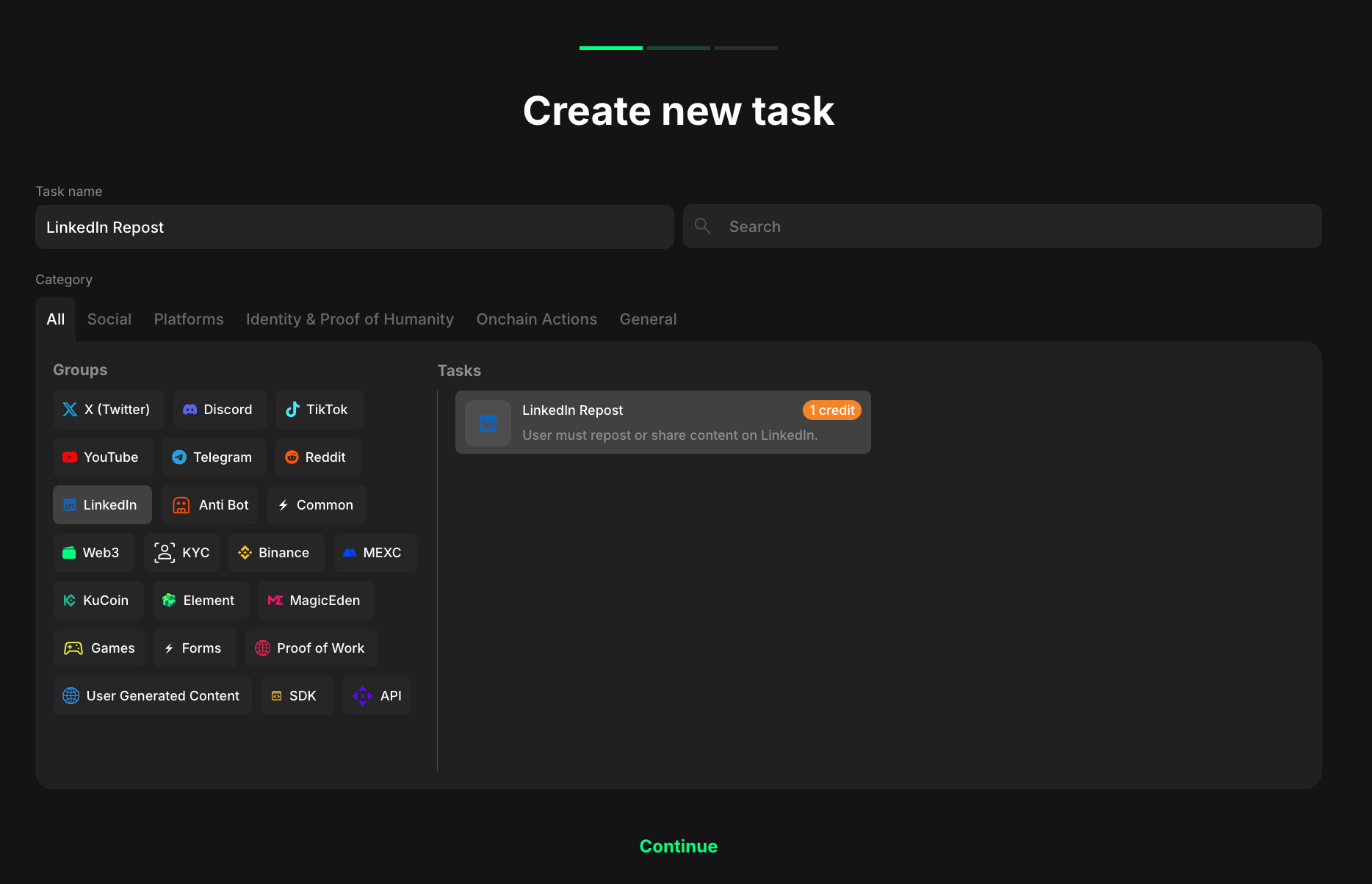 1. Select **LinkedIn** to indicate that the task will be completed with this specific platform.
2. Considering your aim, select the specific task type from the expanded list.
## Configure task settings
You'll now be able to configure the repost task based on your reward structure and post type:
1. Select **LinkedIn** to indicate that the task will be completed with this specific platform.
2. Considering your aim, select the specific task type from the expanded list.
## Configure task settings
You'll now be able to configure the repost task based on your reward structure and post type:
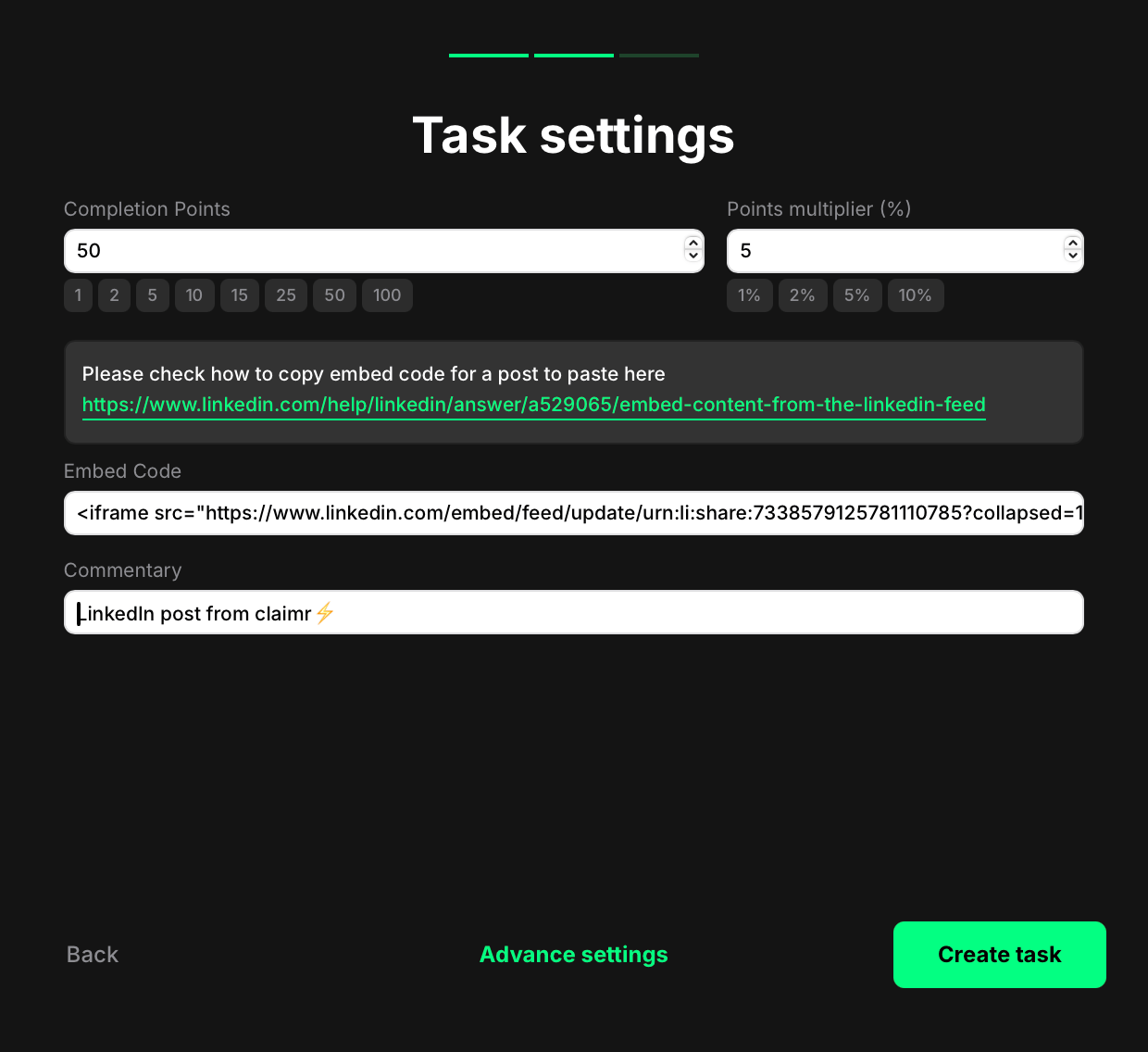 * **Completion Points**: Set how many points a user earns for reposting the LinkedIn post.
* **Points multiplier (%)**: Add an optional bonus. The multiplier increases the base reward by a percentage. For example, if your completion points are set to 100 and your multiplier is 5%, the final reward is 105 points.
* **Embed Code**: Paste the LinkedIn embed iframe for the post you want users to share. [Need help? Here's how to copy a LinkedIn embed code](https://www.linkedin.com/help/linkedin/answer/a529065/embed-content-from-the-linkedin-feed).
* **Commentary**: Add a brief description for context.
Once you're done:
* Click **Create task** to save and add it to your quest right away. You'll now see the task listed in your quest. From there, you can reorder it, delete it, or edit it anytime.
* Or click **Advanced settings** to continue configuring more options specific to the selected task type.
## User experience
Here's how it looks from the user's side:
* **Completion Points**: Set how many points a user earns for reposting the LinkedIn post.
* **Points multiplier (%)**: Add an optional bonus. The multiplier increases the base reward by a percentage. For example, if your completion points are set to 100 and your multiplier is 5%, the final reward is 105 points.
* **Embed Code**: Paste the LinkedIn embed iframe for the post you want users to share. [Need help? Here's how to copy a LinkedIn embed code](https://www.linkedin.com/help/linkedin/answer/a529065/embed-content-from-the-linkedin-feed).
* **Commentary**: Add a brief description for context.
Once you're done:
* Click **Create task** to save and add it to your quest right away. You'll now see the task listed in your quest. From there, you can reorder it, delete it, or edit it anytime.
* Or click **Advanced settings** to continue configuring more options specific to the selected task type.
## User experience
Here's how it looks from the user's side:
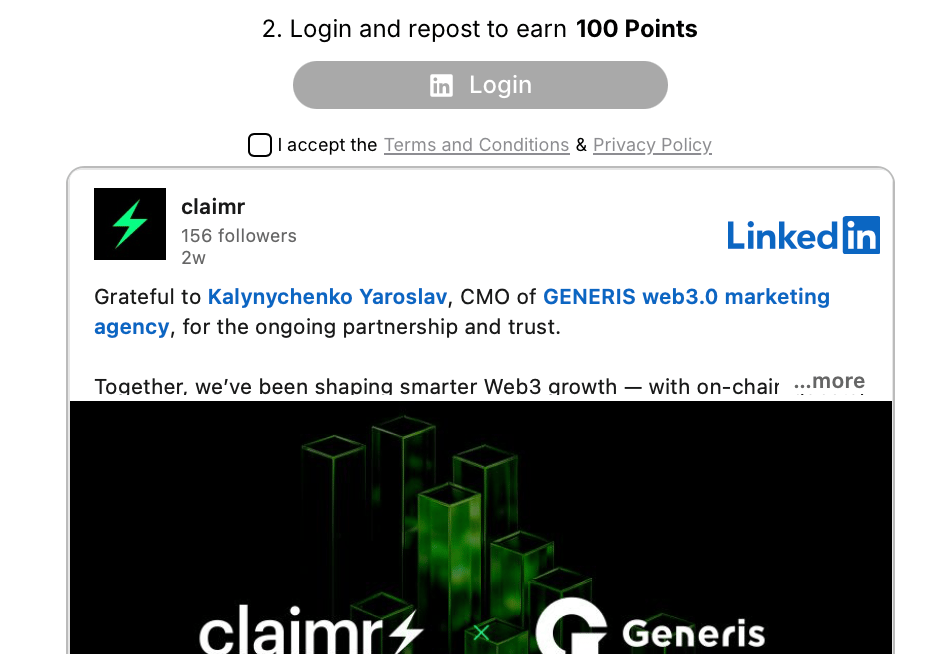 1. The user logs in and connects their LinkedIn account.
2. They see the embedded LinkedIn post inside the widget.
3. After clicking Login and Repost, they automatically receive the assigned points.
This process ensures that reposts are verified and trackable, without requiring manual submission.
1. The user logs in and connects their LinkedIn account.
2. They see the embedded LinkedIn post inside the widget.
3. After clicking Login and Repost, they automatically receive the assigned points.
This process ensures that reposts are verified and trackable, without requiring manual submission.