> ## Documentation Index
> Fetch the complete documentation index at: https://docs.claimr.io/llms.txt
> Use this file to discover all available pages before exploring further.
# YouTube tasks
> Incentivize users to subscribe to your channel or watch your videos, building a loyal community of viewers and subscribers.
## What is a YouTube task?
Engage users with YouTube content and track their interactions with your channel or videos.
**Use YouTube tasks to:**
* Increase your YouTube channel subscribers.
* Drive views and engagement on your videos.
* Promote your YouTube content within your Claimr campaigns.
* Reward users for interacting with your YouTube channel.
* Track the effectiveness of your YouTube marketing efforts.
For detailed information about general task settings, including task name, header, description, rewards, dependencies, and more, refer to the [Task settings](/tasks/task-settings) article.
## Task type
This section allows you to choose the specific type of task you want to create for your campaign.
 1. Select **YouTube** to indicate that the task will be completed with this specific platform.
2. Considering your aim, select the specific task type from the expanded list.
## Task settings
### Submit YouTube video
Reward users for submitting videos on YouTube. This task type helps encourage users to create and share content related to your campaign, brand, or product.
1. Select **YouTube** to indicate that the task will be completed with this specific platform.
2. Considering your aim, select the specific task type from the expanded list.
## Task settings
### Submit YouTube video
Reward users for submitting videos on YouTube. This task type helps encourage users to create and share content related to your campaign, brand, or product.
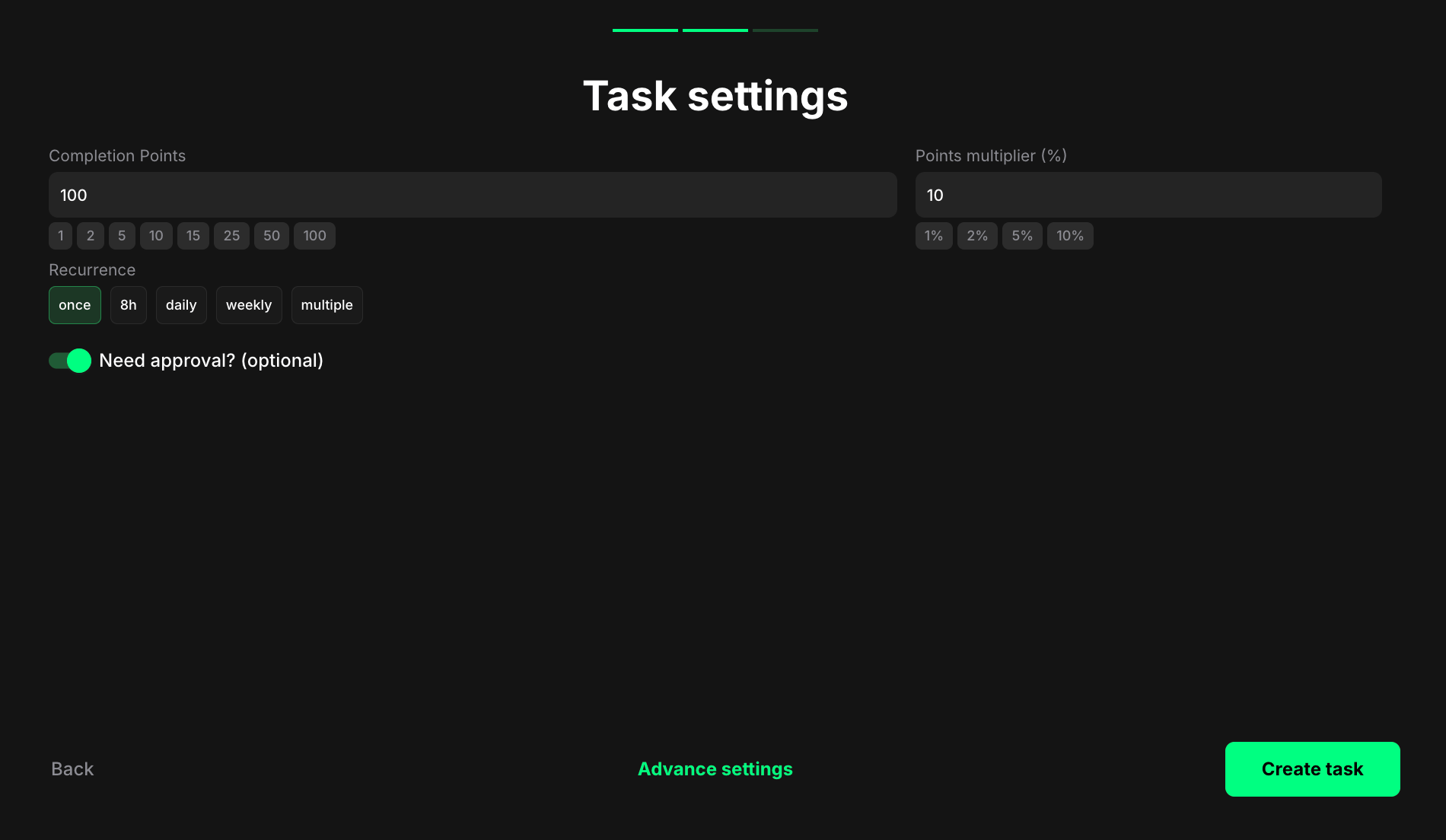 **Completion points**: Set the number of points awarded when the user completes the task.
**Points multiplier (%)**: Add a percentage-based bonus to the total reward. For example, a 10% multiplier increases the final reward by 10%.
**Recurrence**: Control how often users can complete the task:
* Once – can only be completed one time per user.
* Daily – available once every 24 hours.
* Weekly – available once every 7 days.
* Multiple – stays open and can be completed as many times as needed, one after another, without any waiting time.
**Need approval? (optional)**: Turn on to require manual review and approval before the task is marked as complete.
### Subscribe to a channel
Reward users for subscribing to a specific YouTube channel.
**Completion points**: Set the number of points awarded when the user completes the task.
**Points multiplier (%)**: Add a percentage-based bonus to the total reward. For example, a 10% multiplier increases the final reward by 10%.
**Recurrence**: Control how often users can complete the task:
* Once – can only be completed one time per user.
* Daily – available once every 24 hours.
* Weekly – available once every 7 days.
* Multiple – stays open and can be completed as many times as needed, one after another, without any waiting time.
**Need approval? (optional)**: Turn on to require manual review and approval before the task is marked as complete.
### Subscribe to a channel
Reward users for subscribing to a specific YouTube channel.
 **Completion points**: Set the number of points awarded when the user completes the task.
**Points multiplier (%)**: Add a percentage-based bonus to the total reward. For example, a 10% multiplier increases the final reward by 10%.
**YouTube channel ID**: Enter the unique ID of your YouTube channel to enable subscription verification. For example: UCLA\_DiR1fFkNvjvUpBHmylQ. To find it, go to your YouTube channel → About → More → Channel details → Copy channel ID.
**Completion points**: Set the number of points awarded when the user completes the task.
**Points multiplier (%)**: Add a percentage-based bonus to the total reward. For example, a 10% multiplier increases the final reward by 10%.
**YouTube channel ID**: Enter the unique ID of your YouTube channel to enable subscription verification. For example: UCLA\_DiR1fFkNvjvUpBHmylQ. To find it, go to your YouTube channel → About → More → Channel details → Copy channel ID.

 Remember, accuracy is crucial when entering the ID to ensure Claimr can correctly interact with your YouTube channel.
### Watch YouTube video
Reward users for watching a specific YouTube video.
Remember, accuracy is crucial when entering the ID to ensure Claimr can correctly interact with your YouTube channel.
### Watch YouTube video
Reward users for watching a specific YouTube video.
 **Completion points**: Set the number of points awarded when the user completes the task.
**Points multiplier (%)**: Add a percentage-based bonus to the total reward. For example, a 10% multiplier increases the final reward by 10%.
**Recurrence**: Control how often users can complete the task:
* Once – can only be completed one time per user.
* Daily – available once every 24 hours.
* Weekly – available once every 7 days.
* Multiple – stays open and can be completed as many times as needed, one after another, without any waiting time.
**Video ID**: Enter the unique ID of the YouTube video you want users to watch. For example: IGuHERKAiHs. You can find it in the video URL after v=.
**Min watch time in seconds (optional)**: Set the minimum time users must watch the video to complete the task. For example, enter 20 to require at least 20 seconds of viewing.
## Error handling
While setting up your YouTube task, encountering errors is a possibility. Verify that you've entered the correct YouTube channel ID and video ID in the task settings.
If you continue to experience issues, reach out to Claimr's support team for further assistance.
**Completion points**: Set the number of points awarded when the user completes the task.
**Points multiplier (%)**: Add a percentage-based bonus to the total reward. For example, a 10% multiplier increases the final reward by 10%.
**Recurrence**: Control how often users can complete the task:
* Once – can only be completed one time per user.
* Daily – available once every 24 hours.
* Weekly – available once every 7 days.
* Multiple – stays open and can be completed as many times as needed, one after another, without any waiting time.
**Video ID**: Enter the unique ID of the YouTube video you want users to watch. For example: IGuHERKAiHs. You can find it in the video URL after v=.
**Min watch time in seconds (optional)**: Set the minimum time users must watch the video to complete the task. For example, enter 20 to require at least 20 seconds of viewing.
## Error handling
While setting up your YouTube task, encountering errors is a possibility. Verify that you've entered the correct YouTube channel ID and video ID in the task settings.
If you continue to experience issues, reach out to Claimr's support team for further assistance.