> For the complete documentation index, see [llms.txt](https://docs.claimr.io/llms.txt). Markdown versions of documentation pages are available by appending `.md` to page URLs; this page is available as [Markdown](https://docs.claimr.io/how-to/integrate-claimr-widget-into-dapp.md).

# Integrate claimr widget into dApp

## Introduction

You can use the claimr widget inside any TypeScript-based React application to enable blockchain-driven engagement features within your dApp.&#x20;

This setup is ideal for dApps using custom or anonymous wallet layers, such as embedded wallet providers or user flows that require privacy. In these cases, users connect their wallet at a higher level, and you proxy the connection down to the claimr widget, avoiding duplicate wallet prompts and maintaining a seamless UX.

This article demonstrates how to:

* Inject the claimr widget dynamically.
* Pass wallet signatures to claimr without reconnecting.
* Respond to claimr widget events for blockchain interaction.

Main files:

* src/claimr\_wrapper.tsx: Handles claimr widget injection.
* src/wagmi.ts: Sets up wallet connections and providers.
* src/example\_app.tsx & src/main\_page.tsx: The main app UI.

**Ensure you have the following installed:**

* Node.js (v18+ recommended)
* npm or Yarn

## Run the project

Open a terminal and follow the steps below.

1. Navigate to your project directory:

```bash
cd path/to/claimr-dapp-example
```

2. Install dependencies:

Using npm:

```bash
npm install
```

Using Yarn:

```bash
yarn
```

3. Start the development server:

Using npm:

```bash
npm start
```

Using Yarn:

```bash
yarn start
```

4. Visit your app at:

<http://localhost:3000>

### Build for production (optional)

To create a production-ready build:

```bash
npm run build
```

Or

```bash
yarn build

```

This will create a production-ready `build/` folder.

## claimr widget integration

The ClaimrWrapper component is responsible for injecting the claimr widget script into the application. This ensures the widget is loaded dynamically and configured appropriately for your DApp environment.<br>

Script source:

```tsx
https://widgets.claimr.io/claimr.min.js
```

The script is injected with the following attributes:

```tsx
script.setAttribute('data-container', CLAIMR_CONTAINER_ID);
script.setAttribute('data-organization', 'claimr');
script.setAttribute('data-campaign', 'dapp');
script.setAttribute('data-addons', 'sup,eap,eup,pvm,dcc');
script.setAttribute('data-autoresize', 'true');
script.setAttribute('data-platform', 'dapp');
```

These attributes define where the widget should render (data-container), which organization and campaign to load, what feature add-ons are enabled, and that it is running in a DApp context.

The widget script is injected only once per session to avoid duplication.

## App Bootstrapping (example\_app.tsx)

The widget is used within a fully Web3-enabled app context, including support for wallet connections, data fetching, and blockchain interaction. The main provider hierarchy looks like this:

```tsx
<WagmiProvider config={config}>
  <QueryClientProvider client={client}>
    <RainbowKitProvider>
      <ClaimrWrapper>
        <MainPage />
      </ClaimrWrapper>
    </RainbowKitProvider>
  </QueryClientProvider>
</WagmiProvider>
```

This setup provides the following:

* `WagmiProvider`: Wallet and blockchain interaction support.
* `QueryClientProvider`: Enables data fetching via React Query.
* `RainbowKitProvider:` Wallet UI and modal handling.
* `ClaimrWrapper`: Injects and initializes the Claimr widget.

All components inside `MainPage` now have access to both the wallet and the claimr widget.

## Wallet integration (wagmi.ts)

The app uses&#x20;

* @rainbow-me/rainbowkit for wallet modal & connection management
* wagmi for Ethereum interaction abstraction

Chains configured:

* Ethereum Mainnet
* Sepolia testnet
* Arbitrum Sepolia testnet

Configuration:

```tsx
export const config = getDefaultConfig({
  appName: 'claimr dApp example',
  projectId: 'YOUR_WALLETCONNECT_PROJECT_ID',
  chains: [mainnet, sepolia, arbitrumSepolia],
  transports: {
    [mainnet.id]: http(),
    ...
  }
});
```

The `projectId` is from WalletConnect (required by RainbowKit)

## Connecting external wallets to claimr widget

The claimr widget does not manage the wallet directly. Instead, it relies on the host app to pass signed wallet data for authentication.

### Two-way Integration

* Wallet management (connect/disconnect, sign, etc.) is handled via wagmi + RainbowKit.
* The claimr widget uses SDK methods and browser events to communicate with the wallet context.

#### window\.claimr.connect\_wallet(address, signature, message)

This function is called after the user signs a message with their wallet:

```tsx
window.claimr?.connect_wallet(address, signature, message);
```

* `address`: user’s wallet address (from wagmi.useAccount())
* `signature`: result from signMessageAsync()
* `message`: custom nonce + timestamp message (from get\_sign\_message())

It authenticates the user in claimr using a wallet signature.

#### window\.claimr.on\_request = async (...) => { ... }

Set during widget::ready:

```tsx
window.addEventListener('message', process_message);

if (event.data.event === 'widget::ready') {
  window.claimr.on_request = on_request;
}
```

on\_request function handles:

1. Switching chains if needed (switchChainAsync)
2. Calling a contract method with:

* abi, contract, method, args, and chain\_id

3. Returning the transaction hash back to claimr

It lets the claimr widget trigger on-chain actions like NFT mints, token claims, etc., through your dApp’s wallet context.

## Example flows

#### When user opens the app:

* React app loads
* `ClaimrWrapper` injects the widget
* If `localStorage['demo-signature']` exists, it’s reused
* Otherwise: shows “Connect wallet → Sign in” prompt

#### When user signs the message:

* `signMessageAsync()` signs a claimr-auth message
* Signature is saved in`localStorage`
* `window.claimr.connect_wallet(...)` is called to complete login

#### When the widget needs to interact with blockchain:

* Widget emits `widget::ready` event
* Your app assigns the `on_request` handler
* claimr can now ask your app to:
  * Switch chains
  * Execute contract calls

## Campaign configuration: required settings

To ensure the claimr widget works correctly with your dApp, make sure to configure the campaign settings accordingly.&#x20;

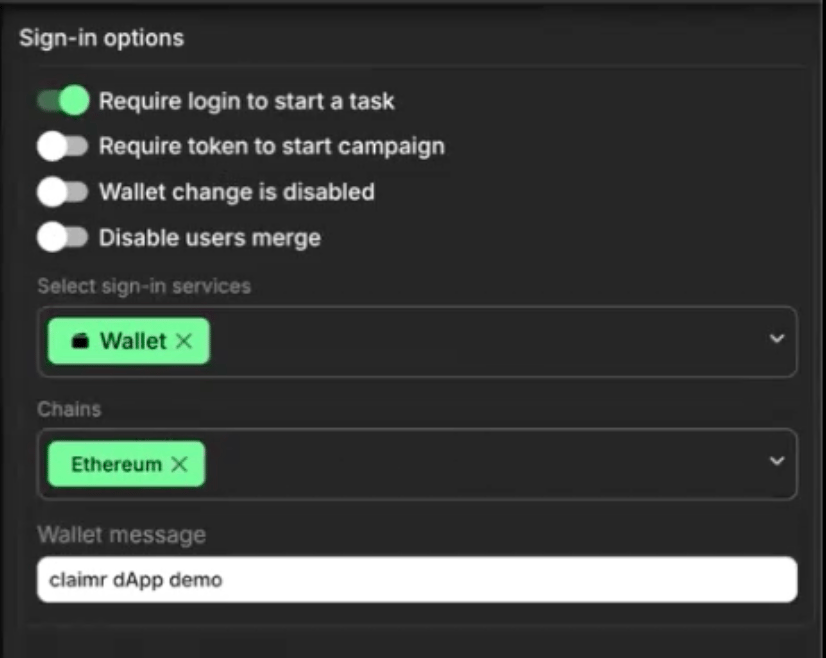
1. **Navigate to Sign-in options:**

* Open your Claimr dashboard.
* Go to your specific campaign.
* Click on **Settings** in the left-hand menu.
* Select **Sign-in options**.

![](/files/0HF1urSlC1Z07yi6Ddoh)<br>

2. **Set the following parameters:**

* ✅ Require login to start a task

  Ensures that users must log in (e.g. via wallet) before they can begin any task. This is necessary for claimr to associate actions with an authenticated wallet address.
* ⚪ Require token to start campaign *(optional)*

  If enabled, this would require a specific token to access the campaign.&#x20;
* ⚪ Wallet change is disabled *(optional)*

  Prevents users from switching wallets mid-session.&#x20;
* ⚪ Disable users merge *(optional)*

  Disables automatic merging of user identities across sign-in methods.&#x20;

3. Select **Wallet** to allow wallet-based login in the Select sign-in services field.&#x20;
4. Select the correct blockchain in the Chains field.
5. In the Wallet message field, enter a custom message that will be shown to users during wallet signature to identify the purpose of signing.

## Summary

| Method           | Triggered by             | Purpose                             |
| ---------------- | ------------------------ | ----------------------------------- |
| `connect_wallet` | Your app (after sign-in) | Authenticate user to Claimr         |
| `on_request`     | Claimr widget            | Let DApp execute blockchain actions |


---

# Agent Instructions
This documentation is published with GitBook. GitBook is the documentation platform designed so that both humans and AI agents can read, navigate, and reason over technical content effectively. Learn more at gitbook.com.

## Querying This Documentation
If you need additional information that is not directly available in this page, you can query the documentation dynamically by asking a question.

Perform an HTTP GET request on the current page URL with the `ask` query parameter, and the optional `goal` query parameter:

```
GET https://docs.claimr.io/how-to/integrate-claimr-widget-into-dapp.md?ask=<question>&goal=<endgoal>
```

`ask` is the immediate question: it should be specific, self-contained, and written in natural language.
`goal` is optional and describes the broader end goal you are ultimately trying to accomplish on behalf of the user. GitBook uses it to tailor the answer towards what is most useful for that goal.

The response will contain a direct answer to the question and relevant excerpts and sources from the documentation.

Use this mechanism when the answer is not explicitly present in the current page, you need clarification or additional context, or you want to retrieve related documentation sections.