> For the complete documentation index, see [llms.txt](https://docs.claimr.io/llms.txt). Markdown versions of documentation pages are available by appending `.md` to page URLs; this page is available as [Markdown](https://docs.claimr.io/data-analytics/failed-actions.md).

# Failed actions

## **What are Failed Actions** analytic&#x73;**?**

Failed Actions analytics provides a detailed overview of actions users attempted that resulted in failure. This helps identify common issues and potential areas for improvement in the user experience when completing tasks within сlaimr⚡️.

## **Use this data to**

* **Identify frequent failure points:** Spot specific actions or tasks that consistently cause issues.
* **Assess impact:** Understand the proportion of users affected by task failures.
* **Improve task clarity and execution:** Address problems to minimize user frustration and ensure successful task completion.
* **Optimize user flow:** Make changes to tasks, improving the users' experience in completing the tasks.

## **Accessing Failed Actions analytics**

1. Log in to your claimr⚡️ account.
2. Select the relevant campaign.
3. Click on the **Analytics** tab.
4. Select **Failed Actions** from the submenu.

Once you select "Failed Actions", the dashboard will open, displaying the two tables. These tables provide a comprehensive view of failed user actions, offering both aggregated and individual-level data.

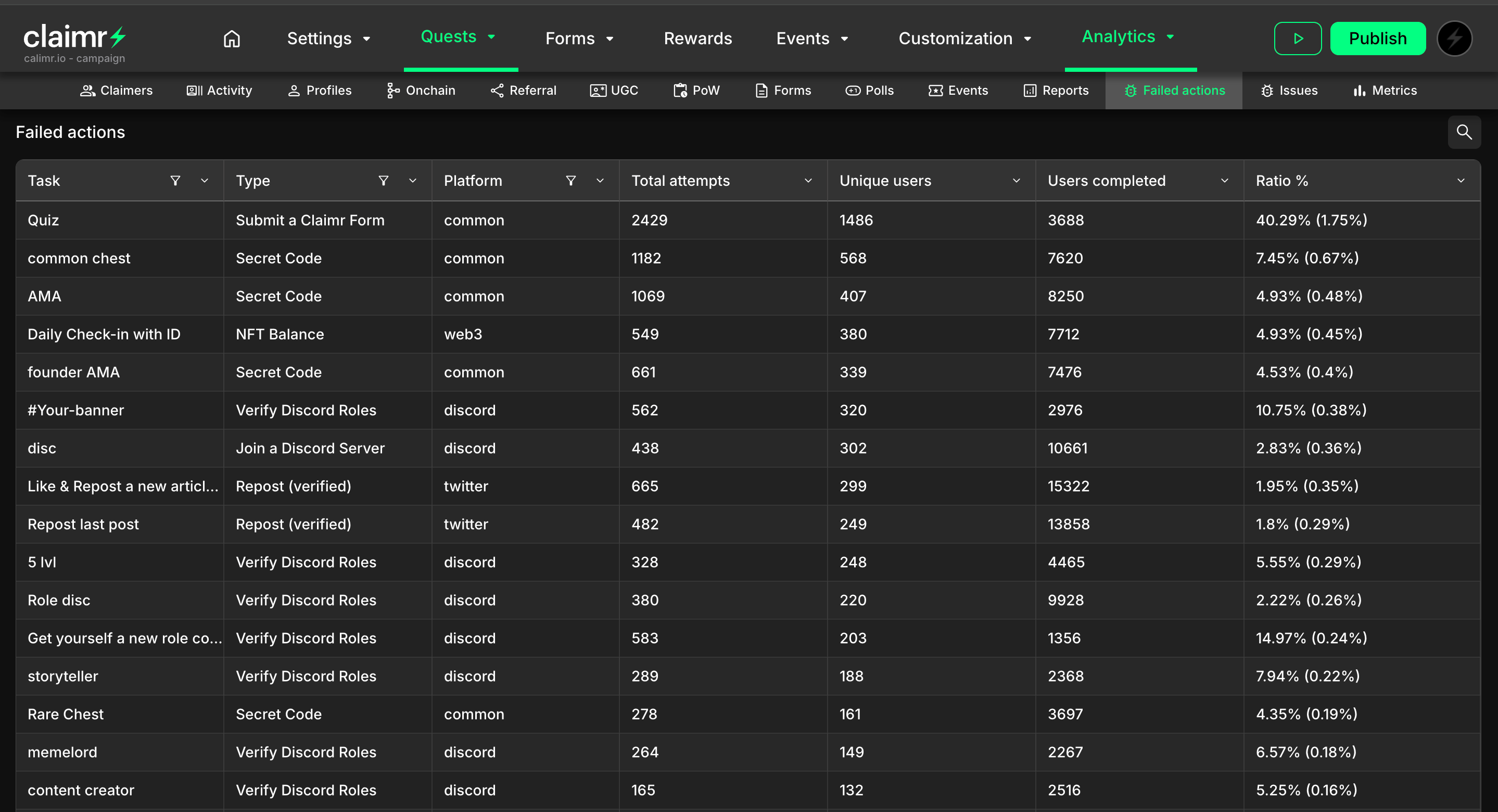
## **Failed Actions log by task** <a href="#issue-dashboard" id="issue-dashboard"></a>

This table offers you detailed insights into specific task failures.&#x20;
<figure><img src="/files/i5nSBROyMnoo0rTJUqBR" alt=""><figcaption></figcaption></figure>

* **Task:** The specific task that users attempted to complete.
* **Type:** The type of action users performed when attempting the task (e.g., “Follow on X”).
* **Platform:** The platform where the action was attempted.
* **Total attempts:** The total number of times users attempted to perform this task.
* **Unique users:** The number of unique users who tried to complete the task, regardless of success or failure.
* **Users completed:** The number of unique users who successfully completed the task.
* **Ratio %:**&#x20;
  * The first percentage shows the ratio of unique users who experienced at least one failure on this action, compared to the total number of unique users who attempted it.
  * The percentage within parentheses shows the ratio of users who had at least one failed action anywhere within the campaign versus all of the participants in the campaign.

## **Failed Actions log by user** <a href="#issue-dashboard" id="issue-dashboard"></a>

<figure><img src="/files/f6L1XvYloZ1RcG9ebYS2" alt=""><figcaption></figcaption></figure>

* **User:** The username or identifier of the user who experienced the failure.
* **Date:** The date and time when the failed action occurred.
* **Task:** The name of a specific task the user was attempting to complete.
* **Type:** The type of the task the user performed.
* **Platform:** The platform where the failed action occurred.

Clicking on any field within this table will open a User Information modal, providing detailed information about the selected user.

{% hint style="info" %}
For more details about all User information in claimr, visit [User information](https://claimr-io.gitbook.io/claimr-help-center/data-analytics/user-information).
{% endhint %}


---

# Agent Instructions
This documentation is published with GitBook. GitBook is the documentation platform designed so that both humans and AI agents can read, navigate, and reason over technical content effectively. Learn more at gitbook.com.

## Querying This Documentation
If you need additional information that is not directly available in this page, you can query the documentation dynamically by asking a question.

Perform an HTTP GET request on the current page URL with the `ask` query parameter, and the optional `goal` query parameter:

```
GET https://docs.claimr.io/data-analytics/failed-actions.md?ask=<question>&goal=<endgoal>
```

`ask` is the immediate question: it should be specific, self-contained, and written in natural language.
`goal` is optional and describes the broader end goal you are ultimately trying to accomplish on behalf of the user. GitBook uses it to tailor the answer towards what is most useful for that goal.

The response will contain a direct answer to the question and relevant excerpts and sources from the documentation.

Use this mechanism when the answer is not explicitly present in the current page, you need clarification or additional context, or you want to retrieve related documentation sections.
