> For the complete documentation index, see [llms.txt](https://docs.claimr.io/llms.txt). Markdown versions of documentation pages are available by appending `.md` to page URLs; this page is available as [Markdown](https://docs.claimr.io/tasks/ugc-tasks.md).

# UGC tasks

## What are UGC tasks?

User-Generated Content (UGC) tasks reward users for creating and sharing content across social platforms. These tasks encourage users to produce posts, videos, images, or links related to your campaign and optionally reward them based on content performance.

**Use UGC tasks to:**

* Encourage content creation across platforms like X (Twitter), TikTok, and YouTube
* Track post performance through impressions or views
* Reward top contributors based on engagement metrics
* Collect user-generated images and links

{% hint style="info" %}
For detailed information about general task settings, including task name, header, description, rewards, dependencies, and more, refer to [Task settings](/tasks/task-settings.md).&#x20;
{% endhint %}

## Configure UGC task

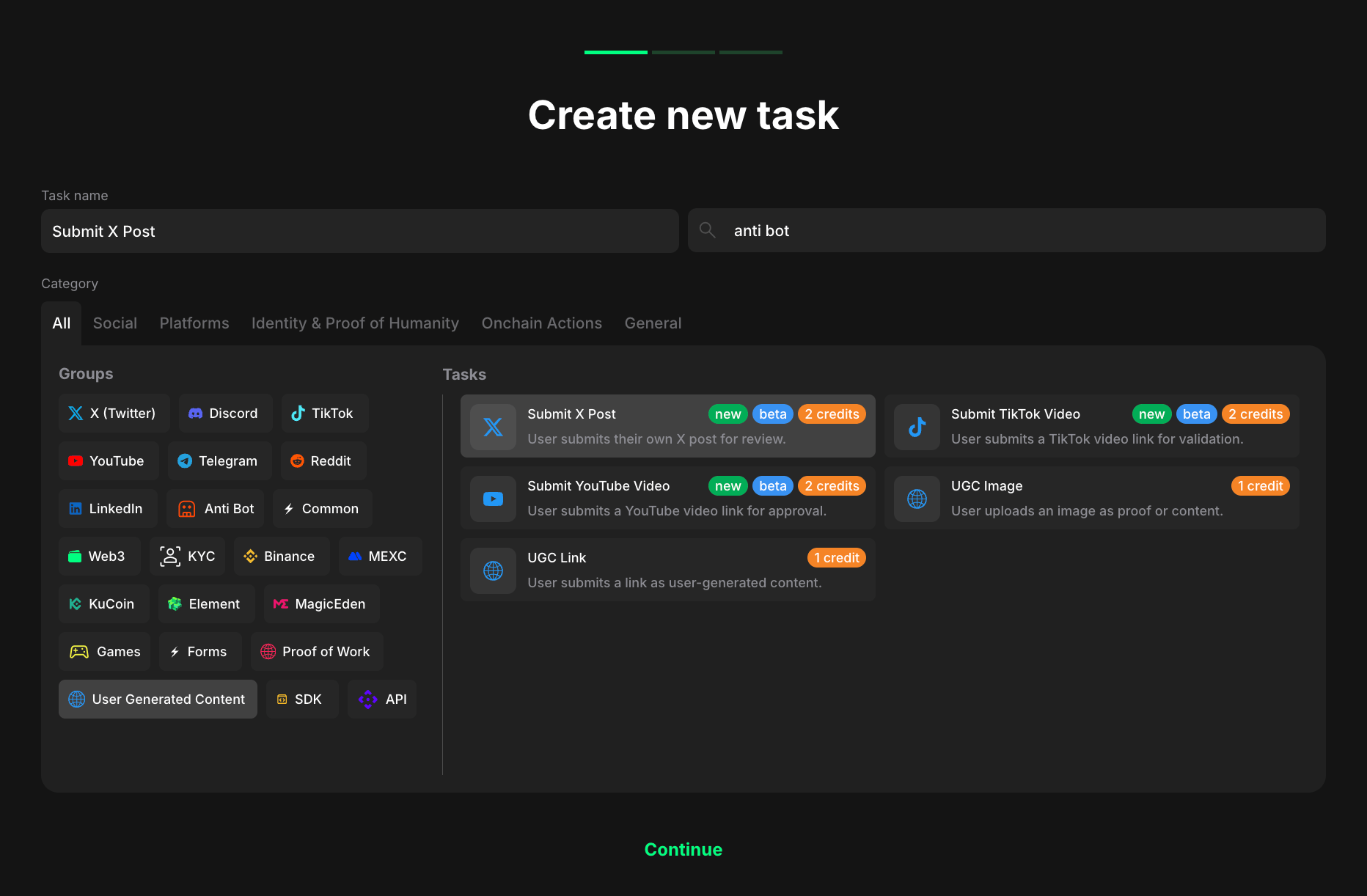
When creating your task, select **User Generated Content** from the Groups section in the General category.
<figure><img src="/files/DM8n8e8mbPK7adp1DmYu" alt="" width="563"><figcaption></figcaption></figure>

You'll see the following task options:

* **Submit X post** - User submits their own X post for review
* **Submit TikTok video** - User submits a TikTok video link for validation
* **Submit YouTube video** - User submits a YouTube video link for approval
* **UGC image** - User uploads an image as proof or content
* **UGC link** - User submits a link as user-generated content

Select the task type that matches your campaign needs, then click **Continue**.

## Submit X post

Reward users for submitting a post on the X platform. This task type encourages users to create and share content related to your campaign, brand, or product on X.
<figure><img src="/files/MoxlTM2dVFznsxTCCDOE" alt="" width="563"><figcaption></figcaption></figure>

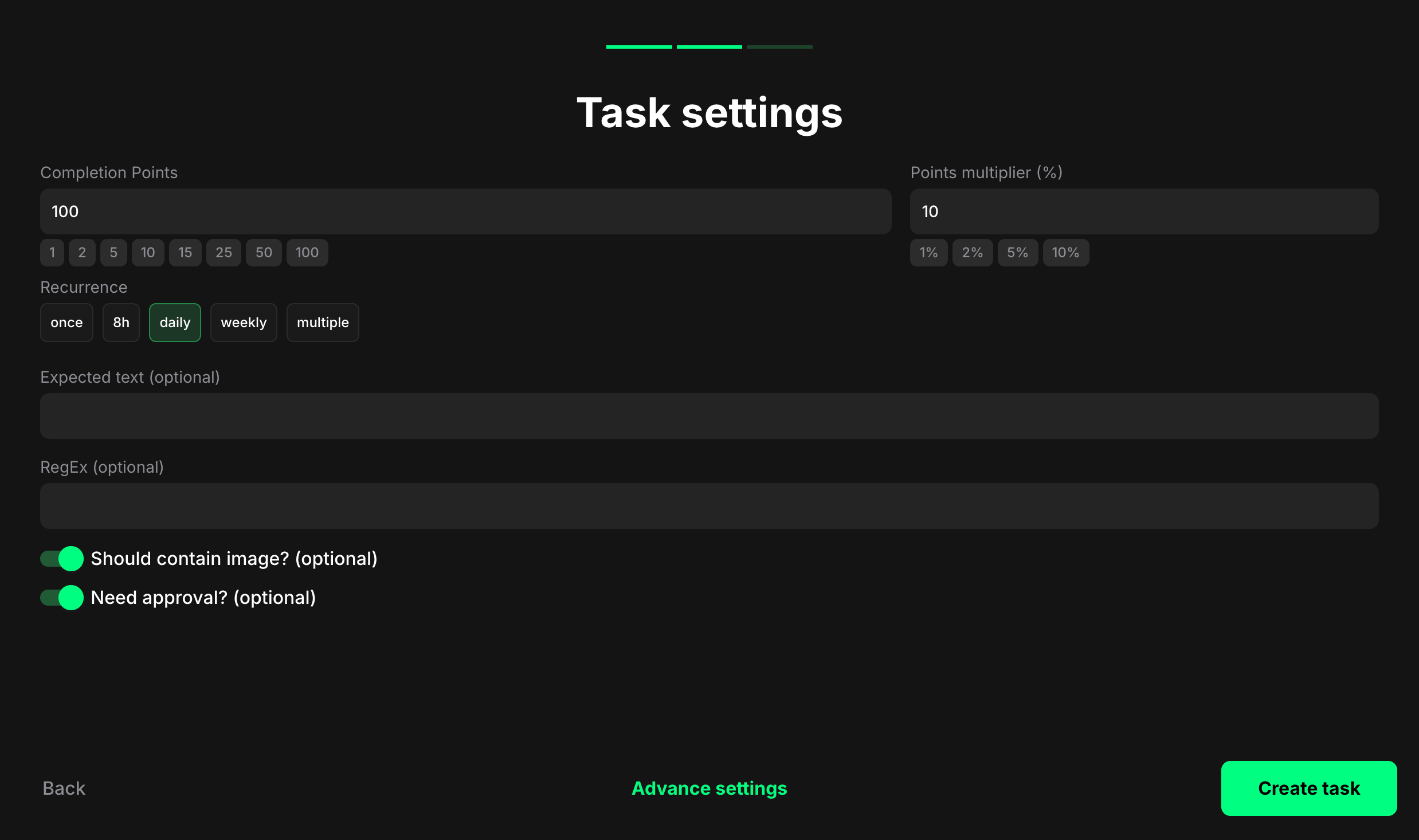
**Completion points**: Set the base points a user earns once the required event count is reached.

**Points multiplier (%)**: Apply a percentage bonus to the base points (e.g., 5 → +5%).

**Recurrence**: Control how often the same user can complete this task:

* **Once** – can be completed one time per user
* **8h** – available once every eight hours
* **Daily** – available once every 24 hours
* **Weekly** – available once every 7 days
* **Multiple** – stays open and can be completed back-to-back with no waiting time

**Expected text (optional)**: Require an exact string that must appear in the user's X post text.

**RegEx (optional)**: Use a regular expression (RegEx) to define a pattern the post must match. This is useful for allowing different spellings, capitalizations, or the inclusion of emojis. Example: `.*🚀.*claimr\.io.*` allows for any characters before or after the emoji and the website link.

**Should contain image? (optional)**: Enable to require the X post to include at least one image.

**Need approval? (optional)**: Enable to require manual review and approval before points are awarded.

## Submit TikTok video

Reward users for submitting videos on TikTok. This task type encourages users to create and share content related to your campaign, brand, or product.
<figure><img src="/files/GmAe0hGjw028WUf7c3rY" alt="" width="563"><figcaption></figcaption></figure>

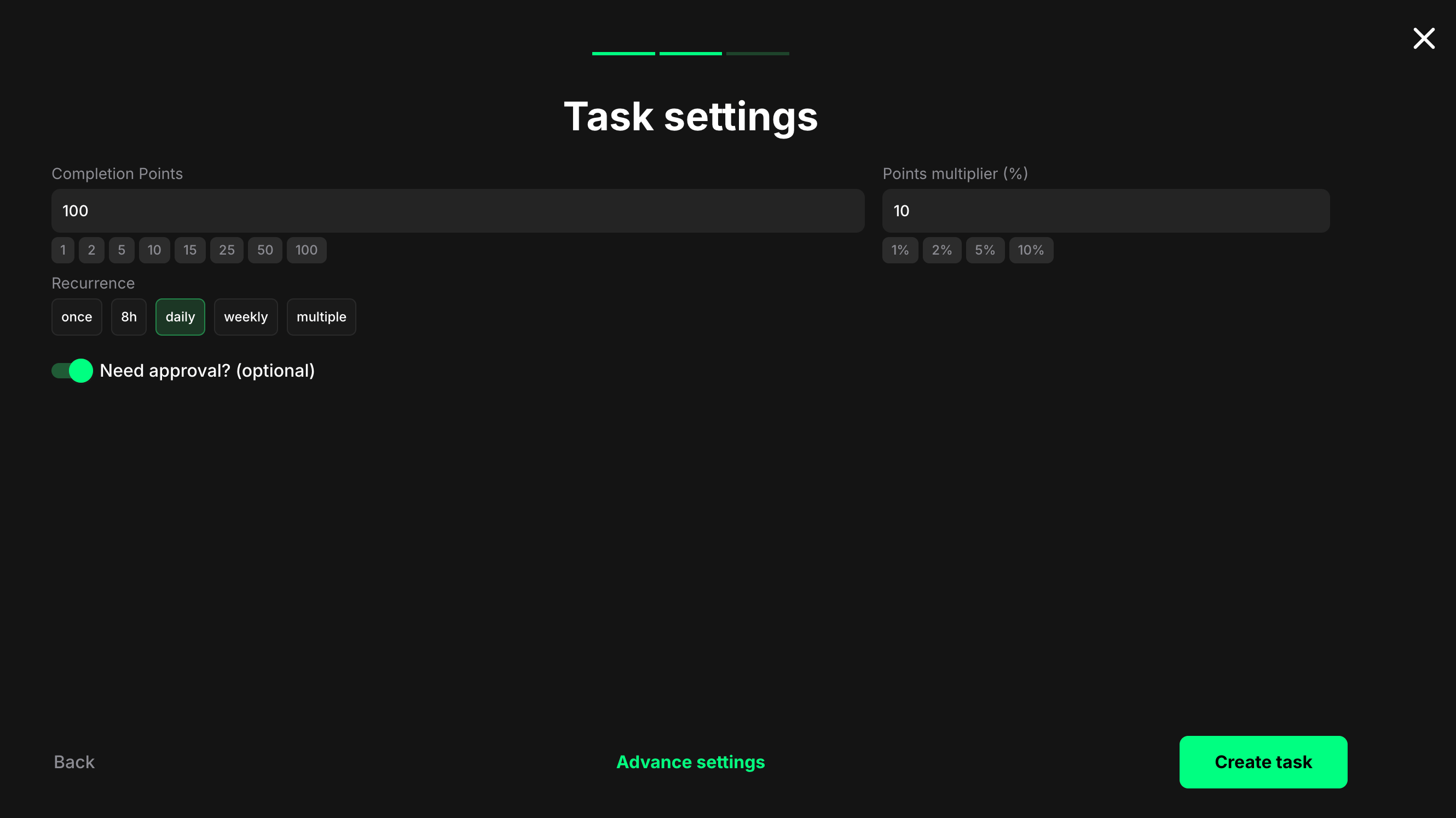
**Completion points**: Set the number of points awarded when the user completes the task.

**Points multiplier (%)**: Add a percentage-based bonus to the total reward. For example, a 10% multiplier increases the final reward by 10%.

**Recurrence**: Control how often users can complete the task:

* **Once** – can only be completed one time per user
* **Daily** – available once every 24 hours
* **Weekly** – available once every 7 days
* **Multiple** – stays open and can be completed as many times as needed, one after another, without any waiting time

**Need approval? (optional)**: Turn on to require manual review and approval before the task is marked as complete.

## Submit YouTube video

Reward users for submitting videos on YouTube. This task type encourages users to create and share content related to your campaign, brand, or product.

<figure><img src="/files/GmAe0hGjw028WUf7c3rY" alt="" width="563"><figcaption></figcaption></figure>

**Completion points**: Set the number of points awarded when the user completes the task.

**Points multiplier (%)**: Add a percentage-based bonus to the total reward. For example, a 10% multiplier increases the final reward by 10%.

**Recurrence**: Control how often users can complete the task:

* **Once** – can only be completed one time per user
* **Daily** – available once every 24 hours
* **Weekly** – available once every 7 days
* **Multiple** – stays open and can be completed as many times as needed, one after another, without any waiting time

**Need approval? (optional)**: Turn on to require manual review and approval before the task is marked as complete.

## UGC image

User uploads an image as proof or content.

<figure><img src="/files/GmAe0hGjw028WUf7c3rY" alt="" width="563"><figcaption></figcaption></figure>

**Completion points**: Set the number of points awarded when the user completes the task.

**Points multiplier (%)**: Add a percentage-based bonus to the total reward. For example, a 5% multiplier increases the final reward by 5%.

**Recurrence**: Control how often users can complete the task:

* **Once** – can only be completed one time per user
* **8h** – available once every eight hours
* **Daily** – available once every 24 hours
* **Weekly** – available once every 7 days
* **Multiple** – stays open and can be completed as many times as needed, one after another, without any waiting time

**Need approval? (optional)**: Turn on to require manual review and approval before points are awarded.

## UGC link

User submits a link as user-generated content.
<figure><img src="/files/v9GabMGqBG7sAug8U4ec" alt="" width="563"><figcaption></figcaption></figure>

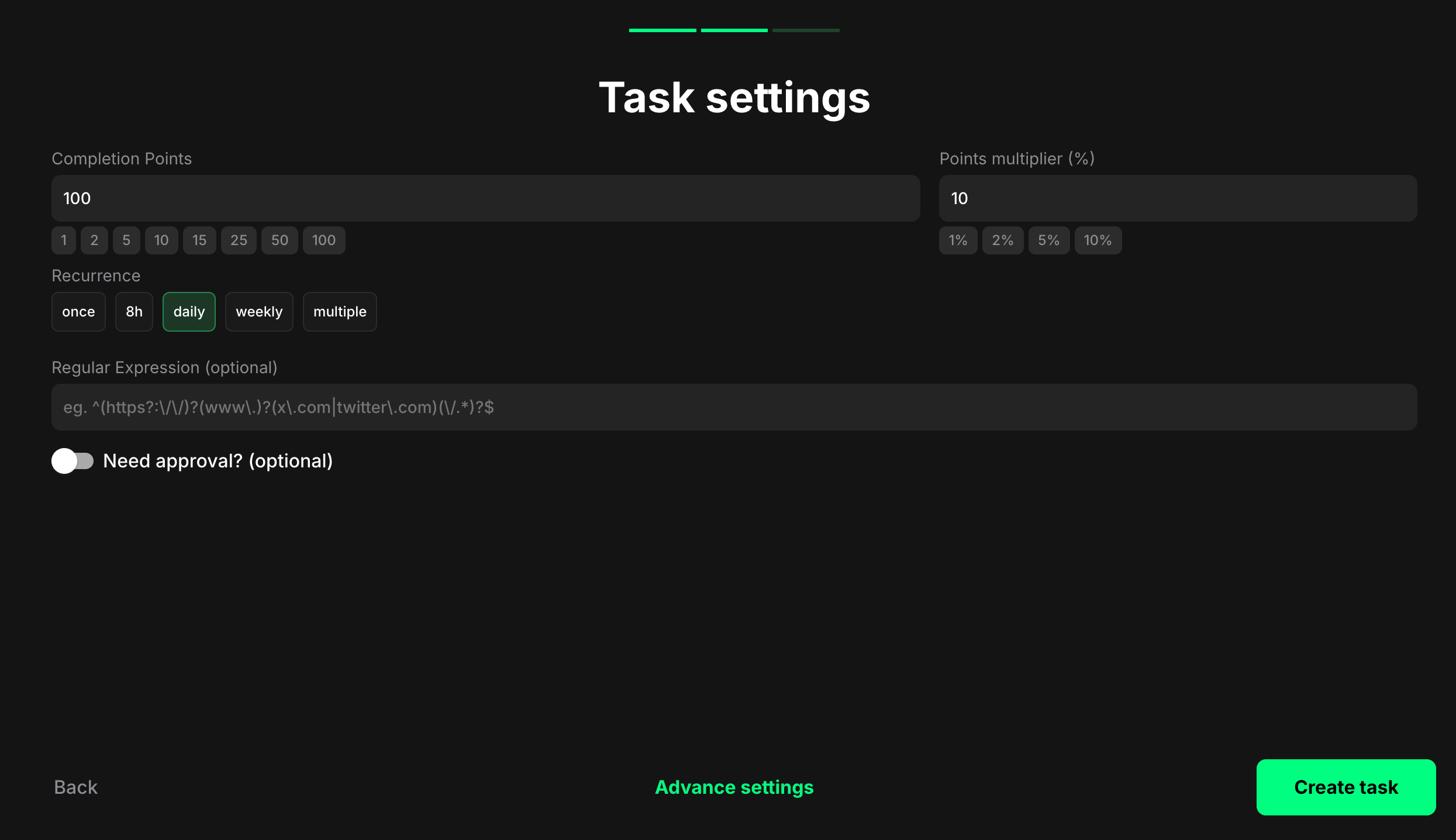
**Completion points**: Set the number of points awarded when the user completes the task.

**Points multiplier (%)**: Add a percentage-based bonus to the total reward. For example, a 5% multiplier increases the final reward by 5%.

**Recurrence**: Control how often users can complete the task:

* **Once** – can only be completed one time per user
* **8h** – available once every eight hours
* **Daily** – available once every 24 hours
* **Weekly** – available once every 7 days
* **Multiple** – stays open and can be completed as many times as needed, one after another, without any waiting time

**Regular Expression (optional)**: Enter a regular expression (RegEx) to validate the URL format. Example: `^(https?:\/\/)?(www\.)?([x|twitter]\.com)(\/.*)$` to allow for any characters before or after the URL pattern.

**Need approval? (optional)**: Turn on to require manual review and approval before points are awarded.

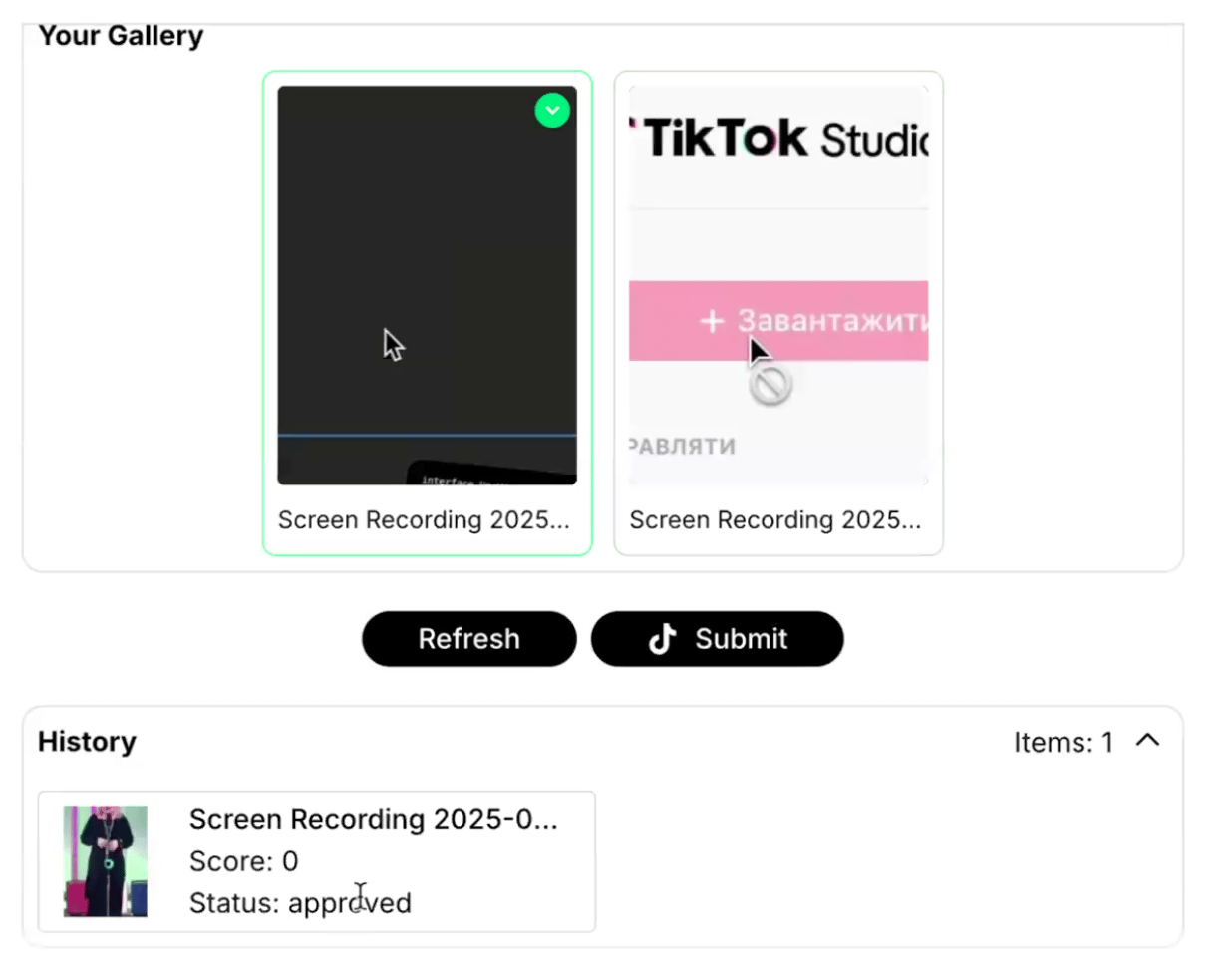
## How "Multiple" setting works for users

When a UGC task is set to recurrence = multiple, users see a gallery sourced from their connected account and the history of sent content.
<figure><img src="/files/kzMbgi5oyiThqsjZvmYJ" alt="" width="375"><figcaption></figcaption></figure>

Users can:

* Browse their previous submissions
* Select content from their connected platform
* Submit new content multiple times
* Track which content has already been submitted

## Save and preview

After configuring your UGC task settings:

**Advance settings**: Click to configure additional task settings like dependencies, completion pop-ups, and metadata. To find out more, read our [Task settings](/tasks/task-settings.md) article.&#x20;

**Create task**: Click to save your task and add it to your quest

{% hint style="info" %}
**Pro tip**: Enable "Need approval?" for tasks where content quality matters. This lets you review submissions before awarding points and ensures brand-appropriate content.&#x20;
{% endhint %}


---

# Agent Instructions
This documentation is published with GitBook. GitBook is the documentation platform designed so that both humans and AI agents can read, navigate, and reason over technical content effectively. Learn more at gitbook.com.

## Querying This Documentation
If you need additional information that is not directly available in this page, you can query the documentation dynamically by asking a question.

Perform an HTTP GET request on the current page URL with the `ask` query parameter, and the optional `goal` query parameter:

```
GET https://docs.claimr.io/tasks/ugc-tasks.md?ask=<question>&goal=<endgoal>
```

`ask` is the immediate question: it should be specific, self-contained, and written in natural language.
`goal` is optional and describes the broader end goal you are ultimately trying to accomplish on behalf of the user. GitBook uses it to tailor the answer towards what is most useful for that goal.

The response will contain a direct answer to the question and relevant excerpts and sources from the documentation.

Use this mechanism when the answer is not explicitly present in the current page, you need clarification or additional context, or you want to retrieve related documentation sections.
