> For the complete documentation index, see [llms.txt](https://docs.claimr.io/llms.txt). Markdown versions of documentation pages are available by appending `.md` to page URLs; this page is available as [Markdown](https://docs.claimr.io/tasks/web3-tasks/mint-an-nft-721.md).

# Mint an NFT (721)

Use this task to drive engagement with your NFT projects, rewarding early adopters, or encouraging participation in exclusive communities or events.

### Before you start

Make sure you have:

* A quest created within your campaign
* The NFT collection contract address
* Knowledge of which blockchain network the NFT is deployed on
* Mint fee amount (if applicable)

### Create the task

Follow the steps in [Web3 tasks](/tasks/web3-tasks.md) to navigate to the task creation screen, select **Web3** from the Groups section, and choose **Mint an NFT (EVM 721)**.

### Task settings

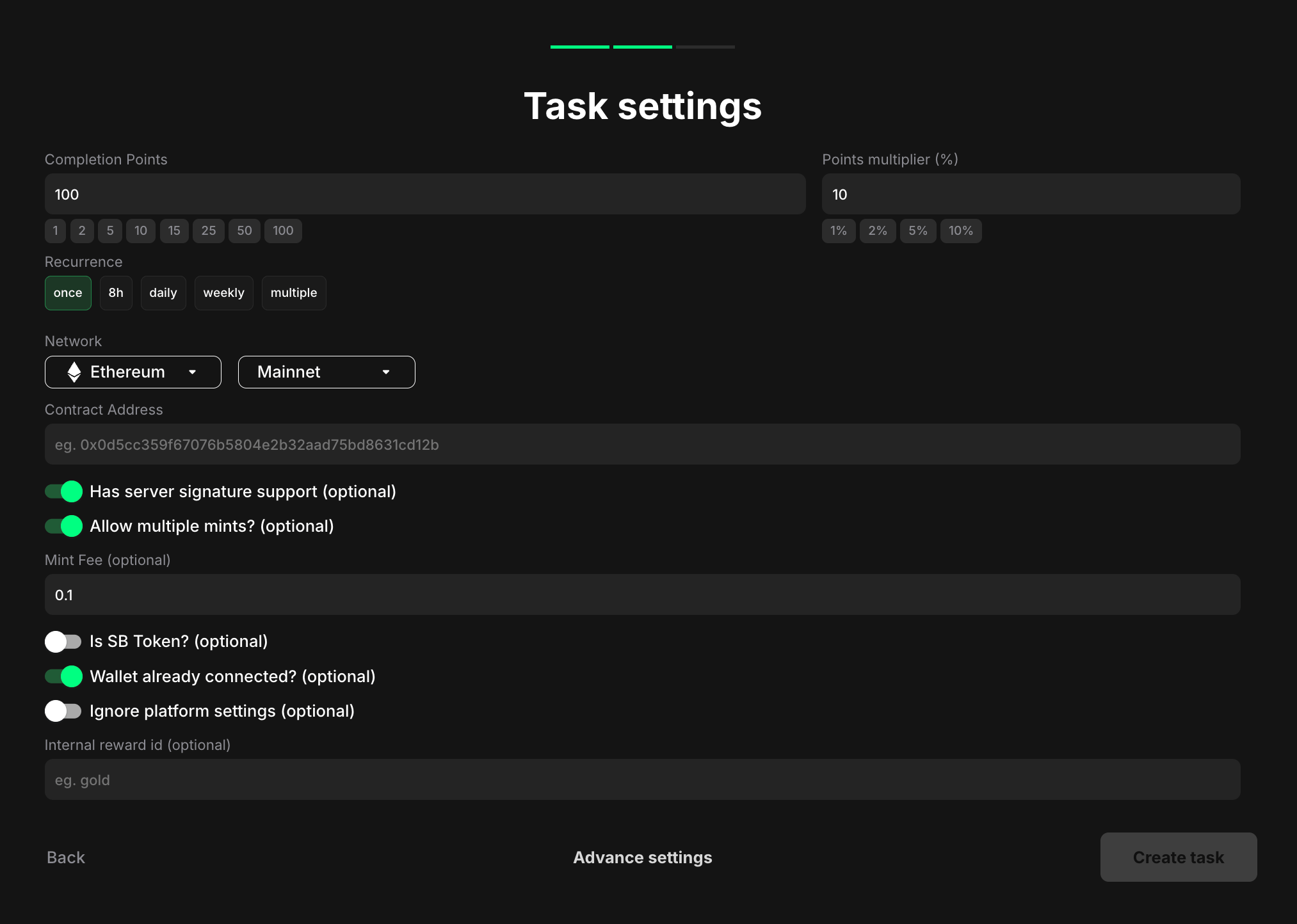
<figure><img src="/files/MvbgQNpFWJNTkPfgorCl" alt="" width="563"><figcaption></figcaption></figure>

**Completion points**: Set the number of points awarded when the user completes the task.

**Points multiplier (%)**: Add a percentage-based bonus to the total reward. For example, a 10% multiplier increases the final reward by 10%.

**Recurrence**: Control how often users can complete the task:

* **Once** – can only be completed one time per user
* **8h** – available once every eight hours
* **Daily** – available once every 24 hours
* **Weekly** – available once every 7 days
* **Multiple** – stays open and can be completed as many times as needed, one after another, without any waiting time

**Network**: Select the blockchain network on which the NFT will be minted.

* Click the first dropdown to choose a network (e.g., Ethereum)
* Click the second dropdown to select Mainnet or Testnet

**Contract Address**: Enter the contract address of the NFT collection or project.

* This is the address where the NFT smart contract is deployed
* Example placeholder: "eg. 0x0d5cc359f67076b5804e2b32aad75bd8631cd12b"

**Has server signature support (optional)**: Toggle this on if your NFT minting process requires server-side signature support.

This is an advanced security feature that protects your NFT mint from unauthorized minting by external users. To utilize this feature, you will need a special contract template—request this from the Claimr support team

**Why server-side signature is important**: All data and events on the blockchain are publicly accessible. This means that anyone with technical knowledge can potentially exploit the NFT minting process. They could bypass your campaign's tasks and mint NFTs directly to their own wallets. Claimr's server-side signature adds a layer of protection. It utilizes a secure server-side wallet to sign a special message that is verified within the NFT contract. This ensures that only authorized mints initiated through your Claimr campaign can be successful.

**Allow multiple mints? (optional)**: Toggle this on if you want to allow users to mint multiple NFTs within this task. By default, a wallet is typically allowed to mint a specific token only once. With this option enabled, the token can be minted multiple times across different tasks (they must be different tasks)

**Mint Fee (optional)**: If there's a fee associated with minting the NFT, specify the amount here.&#x20;

**Is SB Token? (optional)**: Toggle this on if the NFT being minted is an SB (soul-bound) token.

This option allows users to mint the token again even if they have already minted it previously but not within your campaign. Claimr will check the user's balance of this token. If it's greater than 0, the task will be marked as completed after the user clicks Complete

**Wallet already connected? (optional)**: Toggle this on if your campaign is running in a web browser environment where the user's wallet is already connected via SDK (Software Development Kit).

This ensures a smooth and efficient minting experience for users in specific web browser environments where wallet connections are managed externally via SDK.&#x20;

Typically, when a user encounters an NFT minting task in Claimr, they are prompted to connect their wallet before proceeding. By enabling this toggle, Claimr will recognize the existing wallet connection and bypass the connection prompt, directly initiating the minting process.

**Ignore platform settings (optional)**: Toggle this on to ignore platform-level settings for this task.

**Internal reward id (optional)**: Enter an internal identifier for tracking purposes. This is for your internal use and not visible to users.

### **Pro tips**

* Provide clear and concise instructions on how to mint the NFT, including any necessary steps like connecting a wallet, approving transactions, or paying minting fees
* Specify the NFT collection or project name, the benefits of owning the NFT, and any relevant links (e.g., to the minting website or marketplace) in the task description
* Consider displaying images or previews of the NFTs within the task description to make it more engaging

<br>


---

# Agent Instructions
This documentation is published with GitBook. GitBook is the documentation platform designed so that both humans and AI agents can read, navigate, and reason over technical content effectively. Learn more at gitbook.com.

## Querying This Documentation
If you need additional information that is not directly available in this page, you can query the documentation dynamically by asking a question.

Perform an HTTP GET request on the current page URL with the `ask` query parameter, and the optional `goal` query parameter:

```
GET https://docs.claimr.io/tasks/web3-tasks/mint-an-nft-721.md?ask=<question>&goal=<endgoal>
```

`ask` is the immediate question: it should be specific, self-contained, and written in natural language.
`goal` is optional and describes the broader end goal you are ultimately trying to accomplish on behalf of the user. GitBook uses it to tailor the answer towards what is most useful for that goal.

The response will contain a direct answer to the question and relevant excerpts and sources from the documentation.

Use this mechanism when the answer is not explicitly present in the current page, you need clarification or additional context, or you want to retrieve related documentation sections.