> For the complete documentation index, see [llms.txt](https://docs.claimr.io/llms.txt). Markdown versions of documentation pages are available by appending `.md` to page URLs; this page is available as [Markdown](https://docs.claimr.io/tasks/web3-tasks/connect-a-wallet.md).

# Connect a wallet

This task is often a crucial first step for enabling users to participate in Web3 activities, such as claiming tokens, minting NFTs, or interacting with decentralized applications (dApps).

### Before you start

Make sure you have:

* A quest created within your campaign
* A clear understanding of which blockchain networks you want to support
* A message prepared for wallet signature verification

### Create the task

Follow the steps in [Web3 tasks](/tasks/web3-tasks.md) to navigate to the task creation screen, select **Web3** from the Groups section, and choose **Connect a Wallet**.

### Task settings

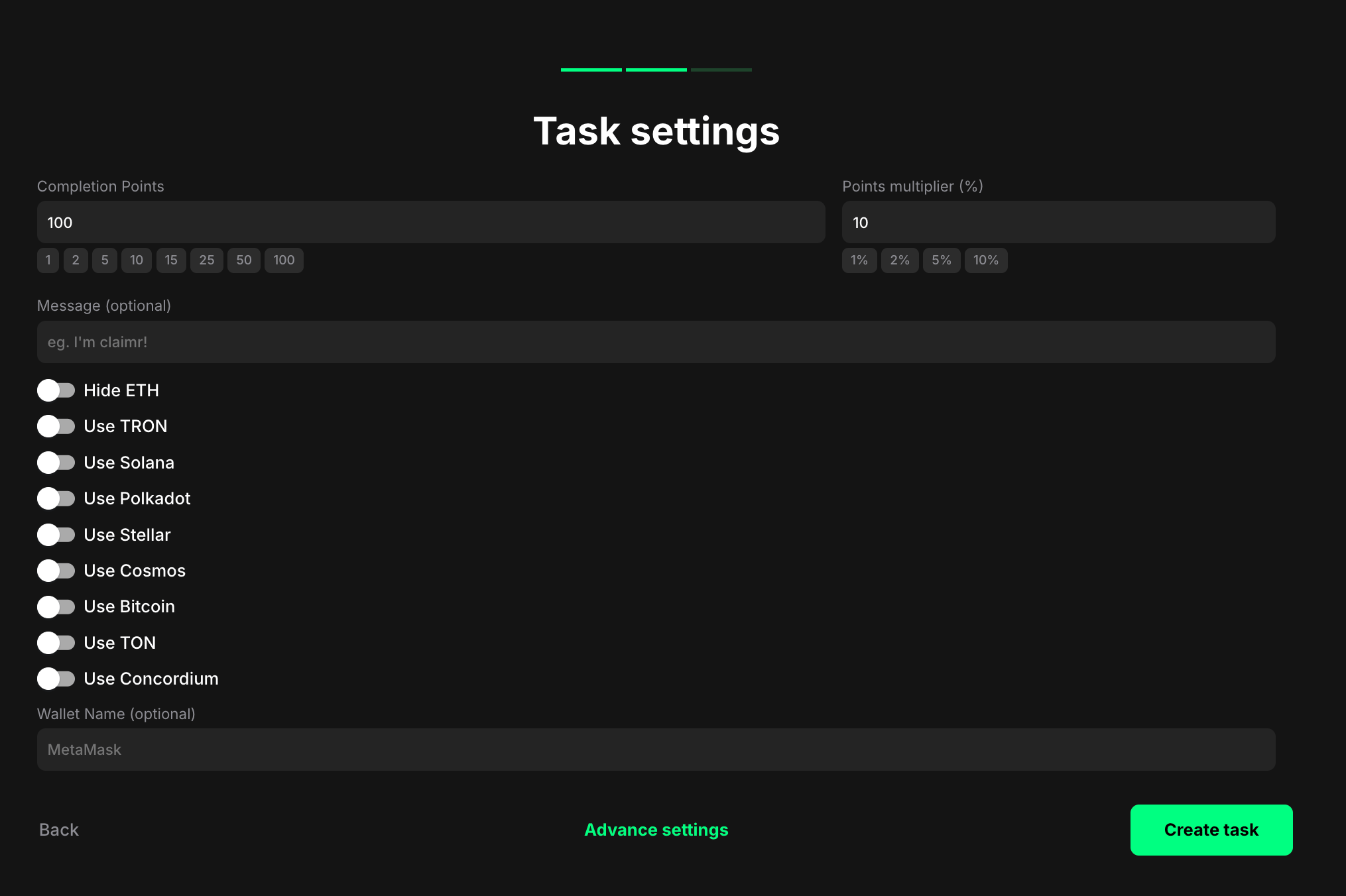
<figure><img src="/files/wRoKRuWFJ3BeBPu9BmWr" alt="" width="563"><figcaption></figcaption></figure>

**Completion points**: Set the number of points awarded when the user completes the task.

**Points multiplier (%)**: Add a percentage-based bonus to the total reward. For example, a 10% multiplier increases the final reward by 10%.

**Message (optional)**: Enter the message that the user will be asked to sign when connecting their wallet. This signature verification process ensures that the user truly owns the wallet they are connecting.

This message is a crucial part of the wallet connection process and helps prevent unauthorized access. Example: "I hereby verify that I own this wallet and am authorizing it to connect to this Claimr campaign."

**Network selection toggles**: Choose the specific blockchain networks you want to allow users to connect their wallets to.

**Wallet Name (optional)**: Specify the name of the wallet provider you want to use for this task.

### Helpful tips&#x20;

* Provide clear and concise instructions on how to connect a wallet in your task description
* Reassure users about the security of their wallet connection and emphasize that you will not have access to their private keys
* Enable multiple networks if your campaign supports cross-chain participation


---

# Agent Instructions
This documentation is published with GitBook. GitBook is the documentation platform designed so that both humans and AI agents can read, navigate, and reason over technical content effectively. Learn more at gitbook.com.

## Querying This Documentation
If you need additional information that is not directly available in this page, you can query the documentation dynamically by asking a question.

Perform an HTTP GET request on the current page URL with the `ask` query parameter, and the optional `goal` query parameter:

```
GET https://docs.claimr.io/tasks/web3-tasks/connect-a-wallet.md?ask=<question>&goal=<endgoal>
```

`ask` is the immediate question: it should be specific, self-contained, and written in natural language.
`goal` is optional and describes the broader end goal you are ultimately trying to accomplish on behalf of the user. GitBook uses it to tailor the answer towards what is most useful for that goal.

The response will contain a direct answer to the question and relevant excerpts and sources from the documentation.

Use this mechanism when the answer is not explicitly present in the current page, you need clarification or additional context, or you want to retrieve related documentation sections.