> For the complete documentation index, see [llms.txt](https://docs.claimr.io/llms.txt). Markdown versions of documentation pages are available by appending `.md` to page URLs; this page is available as [Markdown](https://docs.claimr.io/tasks/common-tasks/referral-tasks.md).

# Referral tasks

## What are Referral tasks?

A Referral task incentivizes users to refer others to your claimr campaign, expanding your reach and growing your community.

**Use Referral tasks to:**

* Increase campaign participation by encouraging users to invite their friends and contacts.
* Reward users for successful referrals, motivating them to spread the word about your campaign.
* Track the effectiveness of your referral program and identify your most influential advocates.
* Expand your audience and reach new potential customers.
* Build a strong community of engaged participants.

For detailed information about general task settings, including task name, header, description, rewards, dependencies, and more, refer to [Task settings](/tasks/task-settings.md).&#x20;

## **Task settings**

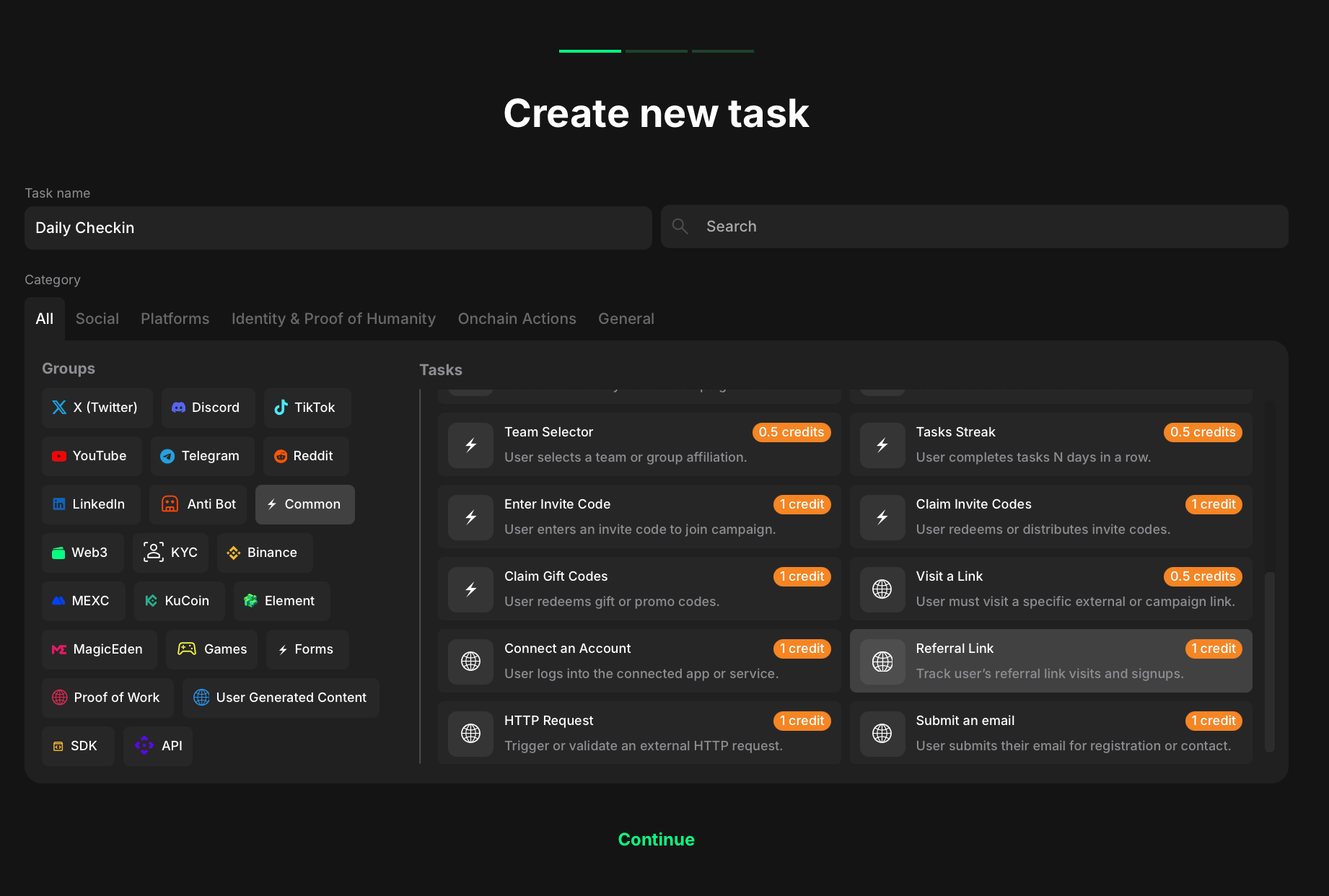
<figure><img src="/files/vZCi3vfYwIseofbhvGfl" alt="" width="563"><figcaption><p>Task type section</p></figcaption></figure>

To create a Referral link task:

1. Go to your quest and click <mark style="color:green;">**+ Create new task**</mark>.
2. Under the Category section, select <mark style="color:green;">**Common**</mark>**.**
3. Choose <mark style="color:green;">**Referral link**</mark> from the list of task types.
4. Click <mark style="color:green;">**Continue**</mark> to proceed to task settings.

Once you've selected both, move on to configuring the specific settings for your referral task.

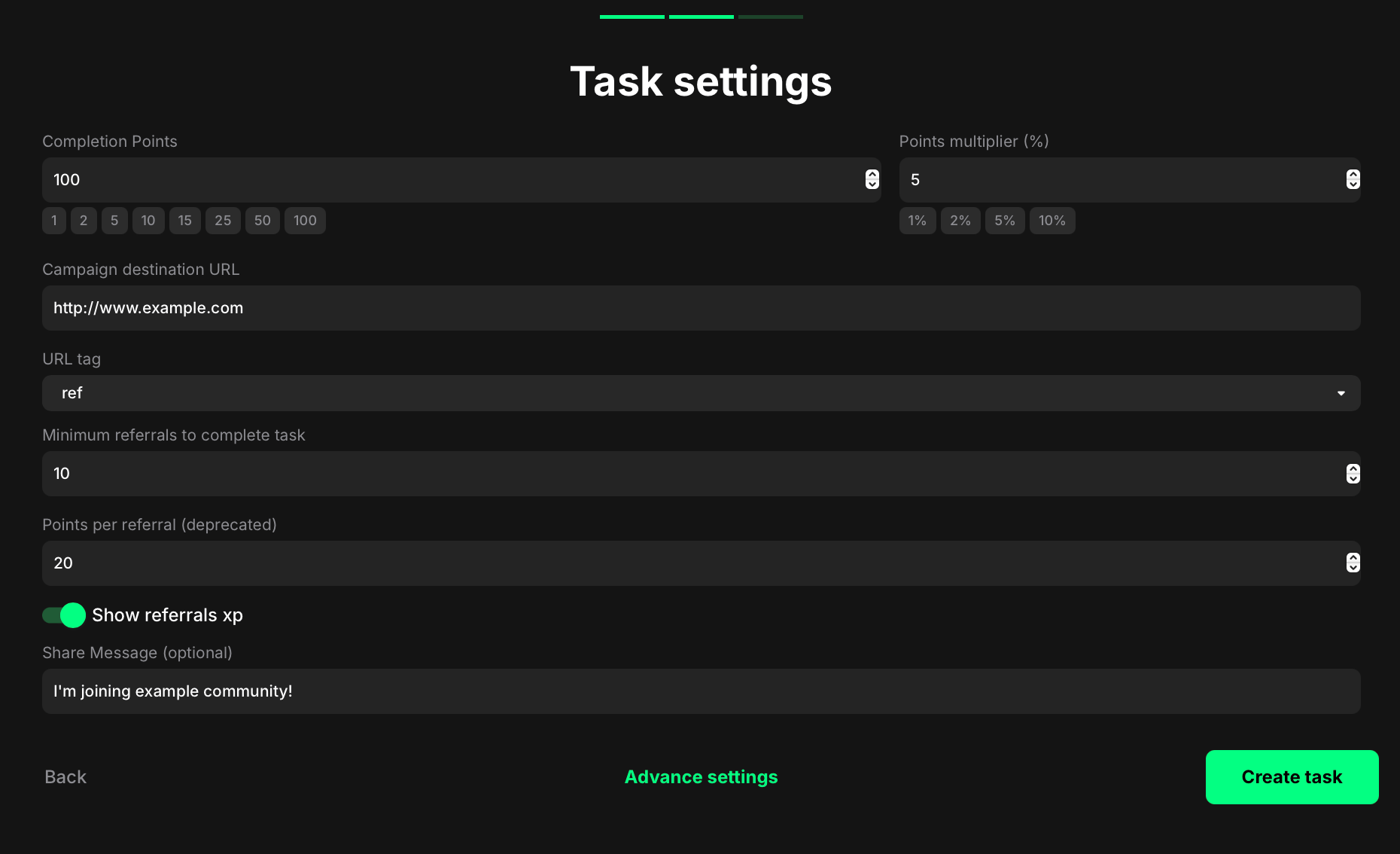
<figure><img src="/files/2Rb0ReYEosbAj7Pd8IWJ" alt="" width="563"><figcaption><p>Task setting section</p></figcaption></figure>

**Completion points:** Set the base points a user earns once the required referral goal for this task is met.

**Points multiplier (%):** Apply a percentage bonus to the base points (e.g., 5 → +5%).

**Campaign destination URL:** Paste the full link people should share (e.g., your campaign or landing page).

**URL tag:** Choose the query key to append to personal referral links (e.g., ref → ...?ref=\<code>).

**Minimum referrals to complete task:** Enter how many successful referrals are required for this task to complete.

**Points per referral (deprecated):** Set optional XP per each successful referral. This field is marked deprecated and may be ignored in workspaces using campaign-level Referral settings.

**Show referrals XP:** Toggle on to display the potential XP from referrals on the quest card; toggle off to hide it.

**Share Message (optional):** Write the prefilled text that appears when participants share their referral link.


---

# Agent Instructions
This documentation is published with GitBook. GitBook is the documentation platform designed so that both humans and AI agents can read, navigate, and reason over technical content effectively. Learn more at gitbook.com.

## Querying This Documentation
If you need additional information that is not directly available in this page, you can query the documentation dynamically by asking a question.

Perform an HTTP GET request on the current page URL with the `ask` query parameter, and the optional `goal` query parameter:

```
GET https://docs.claimr.io/tasks/common-tasks/referral-tasks.md?ask=<question>&goal=<endgoal>
```

`ask` is the immediate question: it should be specific, self-contained, and written in natural language.
`goal` is optional and describes the broader end goal you are ultimately trying to accomplish on behalf of the user. GitBook uses it to tailor the answer towards what is most useful for that goal.

The response will contain a direct answer to the question and relevant excerpts and sources from the documentation.

Use this mechanism when the answer is not explicitly present in the current page, you need clarification or additional context, or you want to retrieve related documentation sections.